CE-RISE DP Storage JSONDB Service
This site contains the technical documentation for the CE-RISE dp-storage-jsondb.
dp-storage-jsondb is a standalone HTTP storage backend used by hex-core-service through the io-http adapter. Its job is deliberately narrow: persist records, retrieve records, evaluate storage-side queries, enforce storage-side access checks, and expose operational endpoints for health, readiness, and API description.
This service does not perform model resolution, payload validation, or orchestration of business workflows. Those responsibilities remain in hex-core-service.
What This Service Does
- Accepts the backend HTTP contract expected by
hex-core-service - Stores full record payloads as JSON documents
- Supports MariaDB, MySQL, and PostgreSQL
- Enforces bearer-token authentication in normal operation
- Applies idempotency protection for record creation
- Evaluates canonical record queries, including JSON payload paths
- Exposes operational endpoints for health and readiness
Where It Sits In The CE-RISE Stack
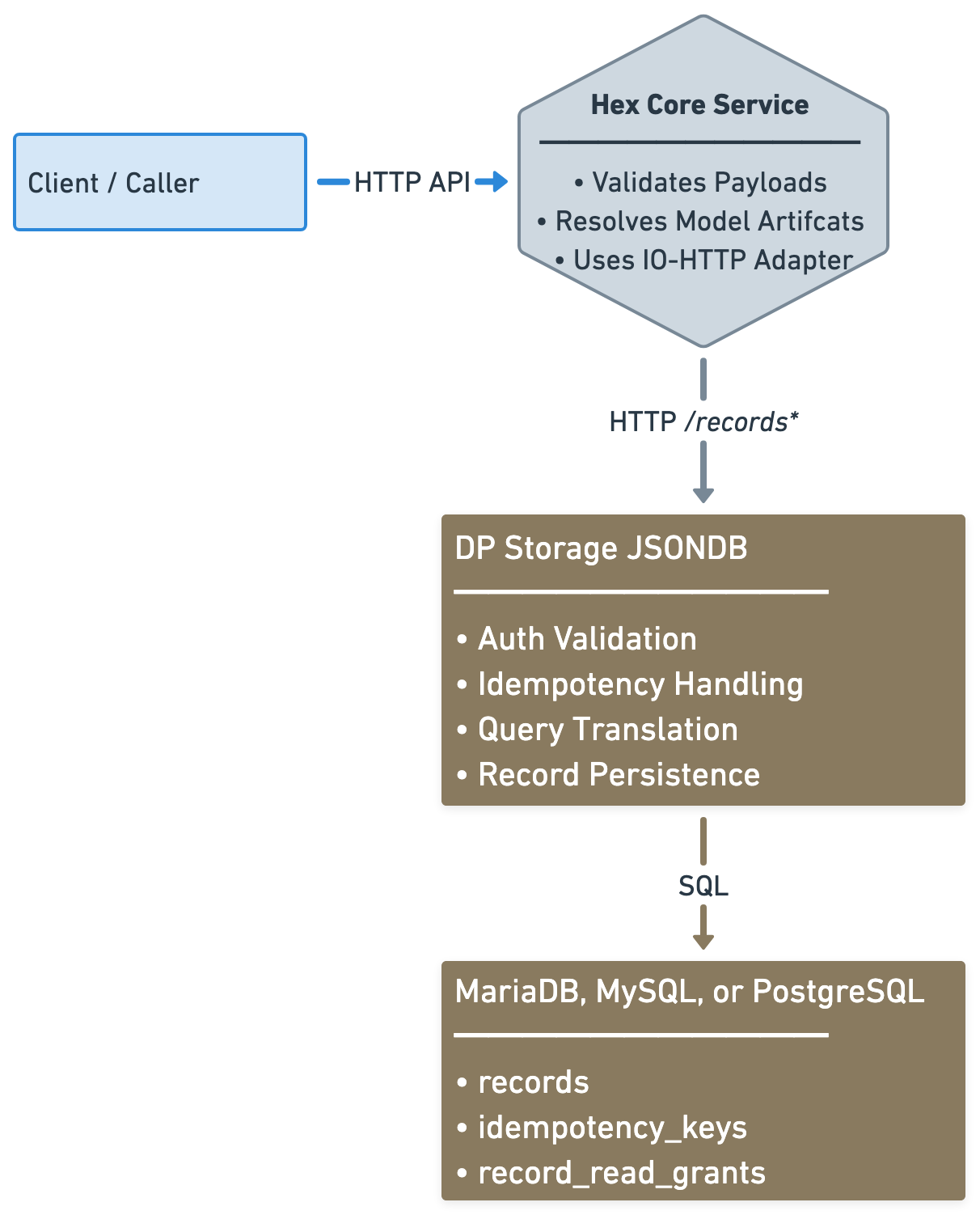
In the primary deployment model, callers do not interact with this service directly. They call hex-core-service, and hex-core-service calls this backend.
Supported Database Backends
The current implementation supports:
- MySQL
- MariaDB
- PostgreSQL
All three backends are exercised by local live-database integration tests.
Documentation Guide
Use the navigation sidebar to access the main topics:
- Architecture and service boundaries
- HTTP contract and endpoint behavior
- Authentication and authorization behavior
- Query language and payload field paths
- Runtime configuration
- Deployment options for each supported database
- Backend-specific notes
- Testing strategy and local integration scripts
- Operational behavior and troubleshooting
First Steps
If you are new to this service, read the pages in this order:
ArchitectureHTTP ContractConfigurationDeploymentOperations
Funded by the European Union under Grant Agreement No. 101092281 — CE-RISE.
Views and opinions expressed are those of the author(s) only and do not necessarily reflect those of the European Union or the granting authority (HADEA).
Neither the European Union nor the granting authority can be held responsible for them.

© 2026 CE-RISE consortium.
Licensed under the European Union Public Licence v1.2 (EUPL-1.2).
Attribution: CE-RISE project (Grant Agreement No. 101092281) and the individual authors/partners as indicated.

Developed by NILU (Riccardo Boero — ribo@nilu.no) within the CE-RISE project.
Architecture
Service Role
dp-storage-jsondb is the persistence backend for CE-RISE hex-core-service.
It exists to provide a stable storage-side HTTP contract behind the hex-core-service io-http adapter. Its responsibility is not to understand model semantics in depth, resolve model artifacts, or validate domain rules. Its responsibility is to accept already-shaped records from hex-core-service, persist them, retrieve them, and evaluate storage-side queries over record metadata and JSON payloads.
This narrow role is intentional. It keeps the persistence layer deployable, replaceable, and testable without mixing orchestration concerns into the storage service.
Logical View
+------------------+
| Client / Caller  |
+--------+---------+
         |
         | public CE-RISE API
         v
+-----------------------------+
| hex-core-service            |
|-----------------------------|
| - authentication context    |
| - model artifact resolution |
| - validation                |
| - orchestration             |
| - io-http adapter           |
+--------------+--------------+
               |
               | backend storage contract
               | POST /records
               | GET  /records/{id}
               | POST /records/query
               v
+-----------------------------+
| dp-storage-jsondb           |
|-----------------------------|
| - auth enforcement          |
| - idempotency control       |
| - query translation         |
| - access enforcement        |
| - persistence               |
| - health/readiness          |
+--------------+--------------+
               |
               | SQL
               v
+-----------------------------------------------+
| MariaDB / MySQL / PostgreSQL                  |
|-----------------------------------------------|
| - records                                     |
| - idempotency_keys                            |
| - record_read_grants                          |
+-----------------------------------------------+
Responsibility Boundaries
Responsibilities of hex-core-service
hex-core-service remains responsible for:
- exposing the primary CE-RISE API surface to callers
- resolving model and version artifacts
- validating payloads against model rules
- deciding when records should be created or queried
- calling the storage backend through the configured outbound adapter
Responsibilities of dp-storage-jsondb
This service is responsible for:
- receiving the storage adapter HTTP calls from
hex-core-service - authenticating and authorizing those requests
- enforcing idempotency on
POST /records - storing complete records as JSON documents
- retrieving stored records by id
- translating canonical query filters into backend SQL
- enforcing storage-side access rules during reads and queries
- reporting health and readiness
Responsibilities of the database backend
The database backend is responsible for:
- durable storage of records and access metadata
- integrity constraints
- persistence of idempotency windows
- supporting the SQL and JSON operations required by this service
Data Model Approach
The storage design deliberately avoids model-specific relational decomposition.
Each record is stored as one full JSON payload, with only a small set of operational metadata columns exposed separately. This makes the service suitable as a generic persistence backend for many digital passport data models without requiring table redesign for each model family.
The current persistent structures are:
recordsidempotency_keysrecord_read_grants
records
Stores the record id, model, version, full payload JSON, creator identity, tenant identity, and timestamps.
idempotency_keys
Stores short-lived replay-protection keys for POST /records so duplicate submissions within the active TTL can be rejected safely.
record_read_grants
Stores explicit read grants used by storage-side access enforcement.
The table itself is created during database initialization through this service’s migrations.
The grant rows inside that table are not created automatically as generic seed data. They are expected to be inserted by an external database-side operation, administrative process, or separate service.
This service enforces stored grants, but it does not expose an HTTP grant-management API.
Access Control Model
Access enforcement currently combines:
- owner subject
- owner tenant
- explicit subject read grants
- explicit tenant read grants
The service stores and enforces these rules when reading or querying records.
Grant creation or governance workflows are outside the scope of this service. In practice, that means an external operation may insert rows into record_read_grants, and this service will honor them during reads and queries.
Backend Strategy
The current implementation supports three SQL backends:
- MySQL
- MariaDB
- PostgreSQL
The codebase separates:
- shared repository contract and record types
- MySQL/MariaDB SQL implementation
- PostgreSQL SQL implementation
This allows backend-specific SQL behavior where necessary without changing the external HTTP contract.
Operational Design Choices
Startup migrations
The service runs its migrations on startup. This keeps first deployment and normal restarts simple as long as migrations remain additive and non-destructive.
Health and readiness separation
/healthanswers whether the process is alive/readyanswers whether the service can currently reach and use its database backend
This distinction matters for orchestrated deployments and container restarts.
Auth modes
Normal operation uses JWT and JWKS validation.
A disabled auth mode exists for local development and testing only.
HTTP Contract
Purpose
This page documents the storage-side HTTP contract implemented by dp-storage-jsondb.
This contract must remain compatible with the hex-core-service io-http adapter. The service is therefore not free to invent a different wire format casually. Any incompatible change to these endpoints is a breaking change for the adapter relationship.
Base Assumption
In the normal CE-RISE deployment model, these endpoints are called by hex-core-service, not directly by end users.
Record Shape
The service stores and returns records compatible with the hex-core-service domain.
{
  "id": "string",
  "model": "string",
  "version": "string",
  "payload": { "any": "json" }
}
Additional persistence-side metadata such as owner subject, tenant, timestamps, and access grants are handled internally and are not part of the main record payload returned by the storage API.
POST /records
Creates a record.
Headers
Authorization: Bearer <token>Idempotency-Key: <key>
Request body
Full Record JSON.
Success response
Status: 200 OK
{ "id": "record-id" }
Required behavior
Idempotency-Keyis mandatory- missing or empty idempotency key returns
400 Bad Request - reuse of an active idempotency key returns
409 Conflict - idempotency keys are globally scoped
- idempotency keys are short-lived replay protection, not permanent deduplication records
- the active TTL target is
120seconds after successful processing
Error cases
400 Bad Requestfor invalid input or missing idempotency key401 Unauthorizedfor missing or invalid bearer token in normal auth mode403 Forbiddenfor valid token withoutrecords:write409 Conflictfor active idempotency reuse or record-id conflict5xxclass behavior is surfaced as service-side internal or unavailable errors depending on the failure
GET /records/{id}
Reads a record by id.
Headers
Authorization: Bearer <token>
Success response
Status: 200 OK
Body: full Record JSON.
Error cases
401 Unauthorizedfor missing or invalid bearer token in normal auth mode403 Forbiddenfor valid token withoutrecords:read404 Not Foundwhen the record does not exist or is not visible through the storage-side access rules
POST /records/query
Queries records using the canonical filter structure.
Headers
Authorization: Bearer <token>
Request body
{
  "filter": {
    "where": [
      { "field": "id", "op": "eq", "value": "record-001" }
    ],
    "sort": [
      { "field": "created_at", "direction": "desc" }
    ],
    "limit": 50,
    "offset": 0
  }
}
Success response
Status: 200 OK
{
  "records": [
    {
      "id": "record-001",
      "model": "passport",
      "version": "1.0.0",
      "payload": {}
    }
  ]
}
Required behavior
- at least one
wherecondition is required sort,limit, andoffsetare supported- payload field paths are supported through the canonical query field syntax
- storage-side access rules are enforced before records are returned
Error cases
400 Bad Requestfor invalid query shape or unsupported field/operator combinations401 Unauthorizedfor missing or invalid bearer token in normal auth mode403 Forbiddenfor valid token withoutrecords:read
GET /health
Liveness endpoint.
Purpose
Confirms the service process is alive.
Expected behavior
Returns a successful response when the HTTP service is running.
This endpoint is not intended to perform deep backend verification.
GET /ready
Readiness endpoint.
Purpose
Confirms the service is ready to serve real traffic.
Expected behavior
The service checks database connectivity before reporting readiness.
If the database backend is unavailable, readiness must fail even if the process itself is alive.
GET /openapi.json
Returns the generated OpenAPI description for this backend service.
This describes the storage-side HTTP contract implemented here, aligned to the adapter expectations used by hex-core-service.
Authentication
Overview
dp-storage-jsondb enforces authentication and authorization on /records* endpoints in normal operation.
The service supports two auth modes:
jwt_jwksdisabled
jwt_jwks is the normal deployment mode. disabled exists only for local development and test scenarios.
JWT and JWKS Mode
When AUTH_MODE=jwt_jwks, the service validates bearer tokens against the configured identity provider settings.
Required runtime settings
AUTH_JWKS_URLAUTH_ISSUERAUTH_AUDIENCE
Validation behavior
The service validates:
- presence of a bearer token
- signature against the configured JWKS
- issuer
- audience
If validation fails, the request is rejected.
Scopes
The service accepts scopes from both:
scopescp
This is intentional so the backend remains compatible with common identity provider claim conventions.
Required scopes
POST /recordsrequiresrecords:writeGET /records/{id}requiresrecords:readPOST /records/queryrequiresrecords:read
Error Semantics
401 Unauthorized
Returned when:
- the bearer token is missing in normal mode
- the token is malformed
- the token signature is invalid
- the issuer or audience is invalid
403 Forbidden
Returned when:
- the token is valid
- but the required scope is not present
This distinction is important because it separates authentication failures from authorization failures.
Disabled Mode
When AUTH_MODE=disabled, the service bypasses JWT validation.
This mode is for:
- local development
- local testing
- manual testing without an identity provider
It must not be treated as a production deployment mode.
Behavior in disabled mode
Requests are accepted without an Authorization header, and the service uses a fixed development identity internally.
This allows local execution without a live JWKS endpoint.
Token Handling Safety
The service must never log raw bearer tokens.
Operational logs may report that authentication failed, but must not expose the token contents.
Identity Context Used By Storage
The service captures and uses identity context for storage-side enforcement:
- subject (
sub) - tenant identifier when present through the authenticated context
These values are used to populate record ownership metadata and to evaluate read visibility rules.
Query Language
Overview
POST /records/query uses the canonical query filter structure aligned with hex-core-service.
The filter language allows the backend to evaluate conditions on:
- root record fields
- selected payload JSON paths
- sort order
- limit
- offset
The service translates this query structure into backend-specific SQL for MySQL, MariaDB, or PostgreSQL.
Filter Shape
{
  "filter": {
    "where": [
      { "field": "payload.record_scope", "op": "eq", "value": "product" },
      { "field": "model", "op": "eq", "value": "passport" }
    ],
    "sort": [
      { "field": "created_at", "direction": "desc" }
    ],
    "limit": 50,
    "offset": 0
  }
}
where
where is required and must contain at least one condition.
Each condition contains:
fieldopvalue
All conditions are currently combined with logical AND.
Supported Operators
The service supports:
eqneincontainsexistsgtgteltlte
Supported Fields
Root fields
Supported root fields are:
idmodelversioncreated_atupdated_at
Payload fields
Payload fields use the payload. prefix.
Examples:
payload.record_scopepayload.metadata.supported_modelspayload.applied_schemas[0].schema_url
Payload Path Rules
Payload field paths are validated before execution.
Allowed forms
- dot notation for object keys
- bracket notation for array indexes
Examples:
payload.metadata.typepayload.sections[0].namepayload.applied_schemas[1].schema_url
Key restrictions
Payload key segments must contain only:
- ASCII letters
- digits
- underscore
This restriction is deliberate. It keeps the generated backend SQL predictable and avoids unsafe path handling.
Operator Semantics
eq and ne
Exact equality and inequality comparisons.
in
Requires an array query value.
The candidate field matches if it equals any of the provided array values.
contains
Used for:
- string containment on string fields
- element containment on array fields
For array fields, the intended semantics are exact element match, including object elements inside JSON arrays.
exists
Requires a boolean query value.
truemeans the field must be presentfalsemeans the field must be absent
Range operators
gtgteltlte
These require a comparable numeric or string query value.
Sorting
sort is optional.
Each sort entry contains:
fielddirection
Supported directions:
ascdesc
Sorting supports both root fields and payload paths.
Limit and Offset
limit and offset are supported as part of the canonical filter shape.
If omitted, the service applies its internal defaults.
Access Enforcement During Query
Query evaluation is not performed over all stored records without restriction.
The service first applies storage-side visibility rules, then returns only records visible to the authenticated access context.
That means the same query can return different results for different callers depending on ownership, tenant association, and stored read grants.
Validation Failures
The service returns 400 Bad Request for invalid query usage, including cases such as:
- empty
where - unsupported field names
- invalid payload path syntax
inwith a non-array valueexistswith a non-boolean value- invalid range comparison types
Configuration
Overview
dp-storage-jsondb is configured entirely through environment variables.
This keeps the container image generic so the same build can be deployed with different database backends, credentials, hostnames, and auth settings without rebuilding the image.
Server Settings
SERVER_HOST
Bind address for the HTTP server.
Typical value:
0.0.0.0
SERVER_PORT
Bind port for the HTTP server.
Typical value:
8080
Database Settings
DB_BACKEND
Selects the database backend implementation.
Supported values:
mysqlmariadbpostgres
DB_HOST
Database host name or IP address.
DB_PORT
Database port.
Default expectation depends on backend:
- MySQL:
3306 - MariaDB:
3306 - PostgreSQL:
5432
DB_NAME
Database name.
DB_USER
Database user.
DB_PASSWORD
Database password.
DB_POOL_SIZE
Maximum number of database connections maintained in the SQL pool.
DB_TIMEOUT_MS
Database connection and acquisition timeout in milliseconds.
Authentication Settings
AUTH_MODE
Supported values:
jwt_jwksdisabled
Use jwt_jwks in normal operation.
Use disabled only for local development and testing.
AUTH_JWKS_URL
JWKS endpoint used to validate bearer tokens in jwt_jwks mode.
AUTH_ISSUER
Expected JWT issuer.
AUTH_AUDIENCE
Expected JWT audience.
Example
SERVER_HOST=0.0.0.0
SERVER_PORT=8080

DB_BACKEND=postgres
DB_HOST=127.0.0.1
DB_PORT=5432
DB_NAME=dp_storage
DB_USER=dp_storage
DB_PASSWORD=change-me
DB_POOL_SIZE=10
DB_TIMEOUT_MS=5000

AUTH_MODE=jwt_jwks
AUTH_JWKS_URL=https://example.org/.well-known/jwks.json
AUTH_ISSUER=https://example.org/
AUTH_AUDIENCE=ce-rise
Startup Migrations
The service runs its migrations on startup.
This means the configured database user must have the privileges required to apply the backend-specific schema for the selected DB_BACKEND.
Configuration Errors
Startup should fail if required configuration is invalid. Typical configuration failures include:
- unsupported
DB_BACKEND - unsupported
AUTH_MODE - invalid numeric values for ports, pool size, or timeout
- invalid bind address resolution
Deployment
Overview
The service is deployed as its own container and connects to an external SQL database backend.
It does not embed the database server inside the service image.
That means a normal deployment consists of:
- one
dp-storage-jsondbcontainer - one SQL backend instance
Container Deployment Model
The service image is backend-agnostic at the container level.
Database selection is made through environment configuration, primarily:
DB_BACKENDDB_HOSTDB_PORTDB_NAMEDB_USERDB_PASSWORD
Supported Compose Deployments
Canonical deployment-oriented compose files are provided for each supported backend:
docker-compose.mysql.ymldocker-compose.mariadb.ymldocker-compose.postgres.yml
These files pair the service container with the matching database container.
MySQL Deployment
Use the MySQL compose file when you want the storage backend to run against MySQL.
Key characteristics:
DB_BACKEND=mysql- MySQL service image
- MySQL-oriented health check
MariaDB Deployment
Use the MariaDB compose file when you want the storage backend to run against MariaDB.
Key characteristics:
DB_BACKEND=mariadb- MariaDB service image
- MariaDB-oriented health check
PostgreSQL Deployment
Use the PostgreSQL compose file when you want the storage backend to run against PostgreSQL.
Key characteristics:
DB_BACKEND=postgres- PostgreSQL service image
- PostgreSQL-oriented health check
Required Deployment Inputs
Before starting a deployment, replace placeholder values for:
- database password
- root or admin password where required by the compose stack
- auth issuer, audience, and JWKS URL
- image tag if you are deploying a specific released version
Startup Sequence
A normal startup sequence is:
- database container becomes healthy
- service container starts
- service runs backend-specific migrations
- service begins accepting HTTP traffic
- readiness succeeds when DB connectivity is confirmed
Networking
The service must be able to reach the database hostname configured through DB_HOST.
In compose deployments this is typically the service name of the paired database container.
Single Image Principle
The service image remains the same regardless of backend.
Backend-specific differences belong in:
- environment variables
- compose manifests
- database server runtime
not in separate application builds.
Database Backends
Overview
dp-storage-jsondb currently supports three SQL backends:
- MySQL
- MariaDB
- PostgreSQL
The external HTTP contract is the same for all of them.
The internal SQL implementation differs where required for:
- connection setup
- migrations
- JSON extraction
- JSON containment
- type handling
MySQL
Support status
Supported.
Notes
MySQL provides native JSON support and is one of the reference backends for this service.
The service uses backend-specific SQL for:
JSON_EXTRACTJSON_UNQUOTEJSON_CONTAINS
MariaDB
Support status
Supported.
Notes
MariaDB is supported explicitly and is tested separately from MySQL.
Even where MariaDB appears similar to MySQL at the schema level, JSON behavior is not identical under the hood, so this backend is treated as a real compatibility target rather than assumed to behave exactly like MySQL.
PostgreSQL
Support status
Supported.
Notes
PostgreSQL uses a separate SQL implementation and migration path.
Its JSON behavior is implemented through PostgreSQL JSONB operators and functions rather than MySQL-style JSON functions.
This backend is now part of the supported runtime surface and is exercised through the local live-database integration path.
Migrations By Backend
The service keeps backend-specific migration directories:
migrations/mysqlmigrations/postgres
The MySQL migration path is used for both MySQL and MariaDB.
Why Backend-Specific SQL Exists
A fully generic SQL layer would hide too much of the real behavior that matters here.
This service needs correct JSON extraction, containment, sorting, and comparison behavior on multiple engines. Those features are not identical across SQL backends.
The implementation therefore uses:
- a shared repository contract
- one SQL repository for MySQL and MariaDB
- one SQL repository for PostgreSQL
That is a more honest design than pretending one SQL text generator can safely cover all backends with no differences.
Testing
Overview
The service uses two testing layers:
- Rust-only tests that do not require a live database
- local live-database integration tests against real SQL containers
This separation is deliberate.
Rust Test Suite
Run the normal Rust test suite with:
cargo test
This covers:
- query logic
- contract behavior at the HTTP layer
- auth behavior
- disabled-auth behavior
- in-memory repository behavior
- integration test harness logic when no live DB is configured
Local Live-Database Integration Tests
The repository SQL implementations are verified locally against real database containers.
MySQL
bash scripts/test-mysql.sh
MariaDB
bash scripts/test-mariadb.sh
PostgreSQL
bash scripts/test-postgres.sh
These scripts:
- start the matching test database container
- wait for the backend to become ready
- set
TEST_DB_*environment variables - run
cargo test --test integration_db - tear the database stack down afterward
What The Integration Test Covers
The live integration test verifies backend behavior for:
- schema migrations
- record creation
- record retrieval
- idempotency conflict handling
- canonical query execution
- payload containment and payload path queries
- sorting, limit, and offset behavior
- tenant and ownership visibility behavior
- explicit read grants
Why Live Backend Testing Matters
JSON behavior and SQL expression details differ across backends.
The service therefore does not rely only on mocked repository tests. Real-engine checks are necessary to verify that the generated SQL and migration assumptions actually work on the supported databases.
CI Boundary
The CI workflow runs the Rust test suite on every push.
Live database containers are intended for local verification in the current workflow model.
Operations
Health and Readiness
The service exposes two operational endpoints.
/health
Use this endpoint to check whether the service process is alive.
This is a liveness indicator.
/ready
Use this endpoint to check whether the service is ready to handle real traffic.
This endpoint verifies database connectivity, so readiness can fail even when liveness succeeds.
Startup Behavior
On startup, the service:
- loads runtime configuration
- initializes authentication behavior
- connects to the configured database backend
- runs backend-specific migrations
- starts the HTTP server
If any of those steps fail, startup fails.
Migrations
The service runs migrations automatically during startup.
Operationally, this means:
- first deployment can initialize the schema automatically
- normal restarts do not reapply already-applied migrations blindly
- future schema changes must remain carefully written and non-destructive unless an intentional breaking migration is planned
Access and Visibility Behavior
Reads and queries are filtered by storage-side visibility rules.
The supporting record_read_grants table is created by the service migrations, but the actual grant rows are expected to come from an external database-side process. This service does not provide an HTTP endpoint for creating those grants.
If an operator sees a 404 or an empty query result where data is expected, the cause may be:
- record really does not exist
- owner subject mismatch
- tenant mismatch
- missing explicit read grant
Common Failure Classes
Database connectivity failure
Symptoms:
- startup fails
/readyfails- repository operations return unavailable or internal errors
Typical causes:
- wrong host or port
- bad credentials
- backend container not ready
- network policy blocking connectivity
Auth configuration failure
Symptoms:
- startup or request-time auth errors
- all protected routes return
401
Typical causes:
- wrong JWKS URL
- wrong issuer
- wrong audience
- unexpected token format from the identity provider
Scope mismatch
Symptoms:
- authenticated requests return
403
Typical cause:
- valid token does not include
records:readorrecords:write
Query validation failure
Symptoms:
POST /records/queryreturns400
Typical causes:
- unsupported field path
- invalid operator usage
- wrong value type for
inorexists - unsupported comparison type
Logging Considerations
Operational logs should help identify failures without leaking sensitive material.
In particular:
- raw bearer tokens must never be logged
- request failures may be classified and described
- database errors may be surfaced in sanitized form
Local Troubleshooting
For backend-specific issues, the fastest checks are usually:
cargo test
bash scripts/test-mysql.sh
bash scripts/test-mariadb.sh
bash scripts/test-postgres.sh
This separates pure Rust regressions from backend-specific SQL issues.