CE-RISE Hex Core Service Documentation
This site contains the technical documentation for the CE-RISE hex-core-service.
Use the navigation sidebar to access architecture, API, configuration, deployment, adapter contract, and operations documentation.
First 5 Minutes
This quickstart verifies that the service is reachable and can process one validation request.
1. Start the service
Run your deployed container (or local instance) with the required environment variables configured.
2. Check health
curl http://localhost:8080/admin/health
Expected response:
{"status":"ok"}
3. Check loaded models
curl http://localhost:8080/models
Pick one model and version from the response.
4. Validate a payload
curl -X POST "http://localhost:8080/models/<model>/versions/<version>:validate" \
  -H "Authorization: Bearer <token>" \
  -H "Content-Type: application/json" \
  -d '{
    "payload": {
      "id": "example-001",
      "name": "example record"
    }
  }'
Expected response shape:
{
  "passed": true,
  "results": []
}
If your auth mode is none, you can omit the Authorization header.
Funded by the European Union under Grant Agreement No. 101092281 — CE-RISE.
Views and opinions expressed are those of the author(s) only and do not necessarily reflect those of the European Union or the granting authority (HADEA).
Neither the European Union nor the granting authority can be held responsible for them.

© 2026 CE-RISE consortium.
Licensed under the European Union Public Licence v1.2 (EUPL-1.2).
Attribution: CE-RISE project (Grant Agreement No. 101092281) and the individual authors/partners as indicated.

Developed by NILU (Riccardo Boero — ribo@nilu.no) within the CE-RISE project.
Architecture
Overview
The CE-RISE Hex Core Service follows a strict hexagonal (ports and adapters) architecture.
The domain and use-case logic in crates/core has no knowledge of HTTP, databases, or any
specific IO provider. All external interactions are mediated through port traits.
Architecture Views
Digital Passport Interaction View
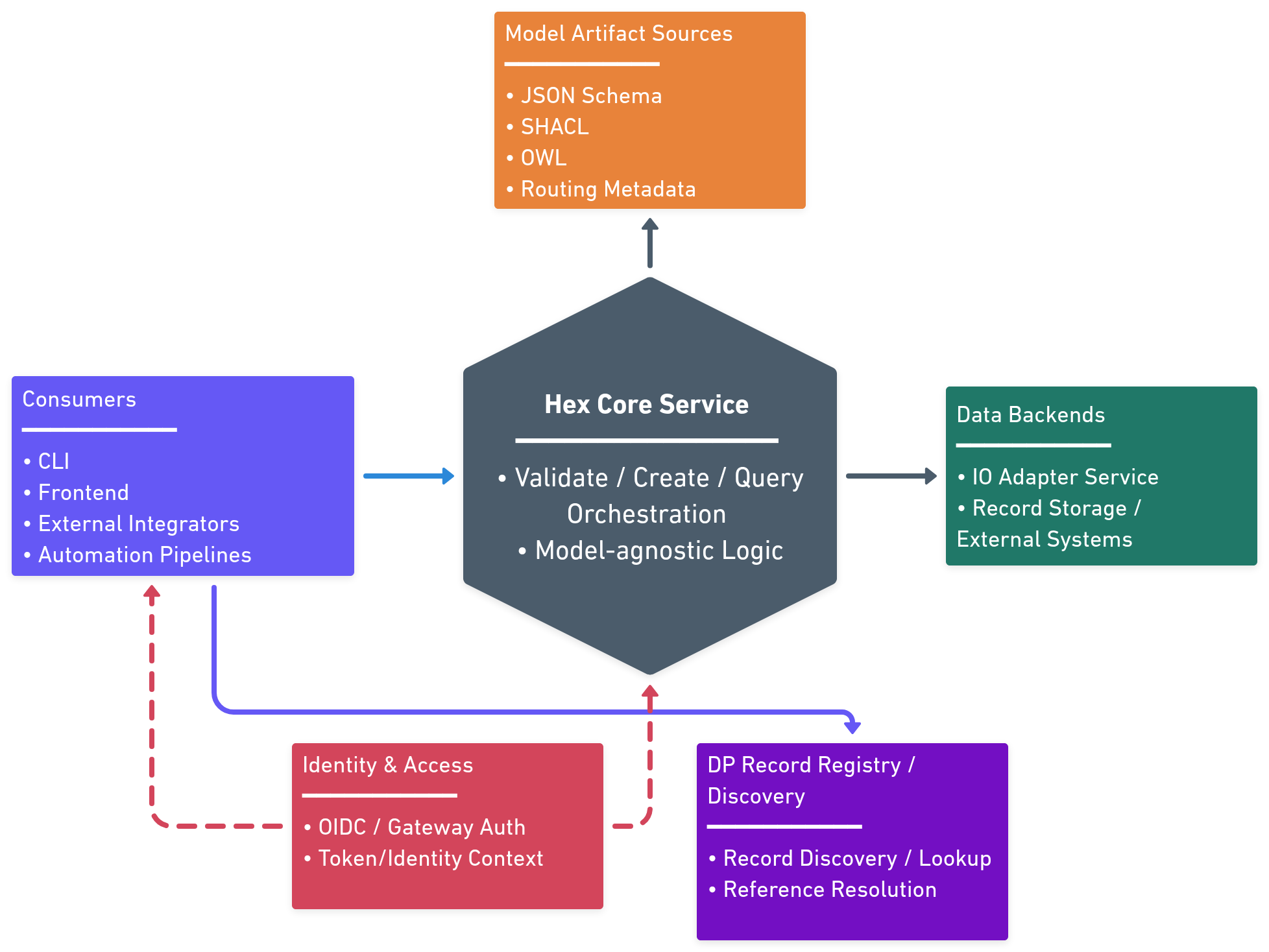
Digital Passport interaction flow showing both external consumption and internal processing: clients submit/query records, the core resolves model artifacts from registry/catalog sources, validates payloads, and reads/writes through configured backend adapters.
Deployment View
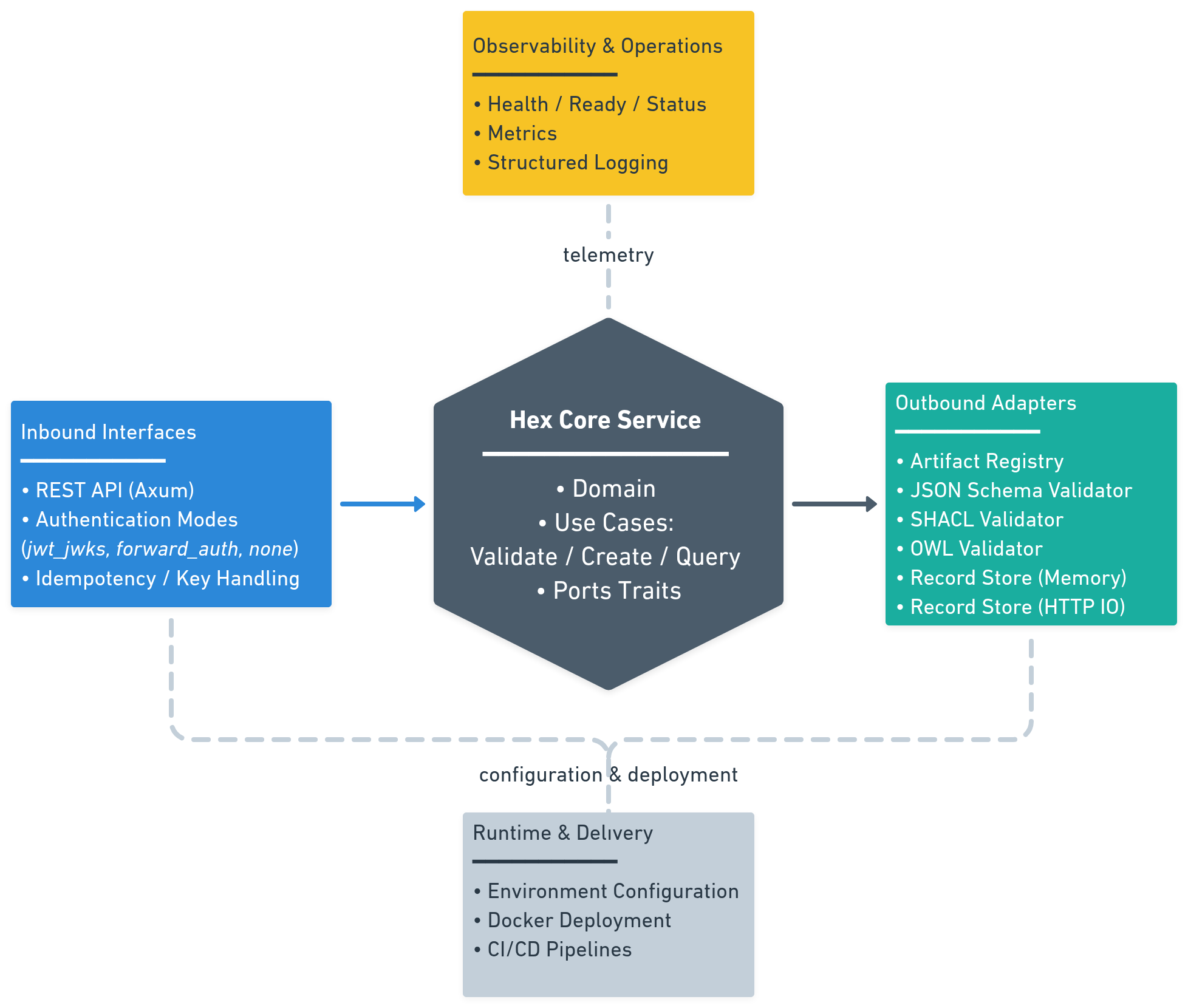
Deployment-oriented architecture view of the hex-core service, showing inbound interfaces, core orchestration, outbound adapters, and runtime dependencies in one deployable unit.
The hexagonal architecture pattern used in this service is also illustrated in the following diagram:
                    ┌──────────────────────────────────────┐
                    │           INBOUND ADAPTERS           │
                    │  REST API (axum)  │  CLI  │  Tests   │
                    └──────────┬──────────────────────────-┘
                               │  calls inbound port traits
                    ┌──────────▼───────────────────────────-┐
                    │             CORE (crate)              │
                    │  ┌────────────────────────────────┐   │
                    │  │   Use Cases (implementations)  │   │
                    │  │  ValidateUseCase               │   │
                    │  │  RecordUseCase                 │   │
                    │  │  EnrichUseCase (opt.)          │   │
                    │  └────────────┬───────────────────┘   │
                    │               │  calls outbound port traits
                    └──────────────-│─────────────────────--┘
                                    │
              ┌─────────────────────┼──────────────────────┐
              │                     │                      │
   ┌──────────▼──────┐  ┌───────────▼──────┐  ┌────────────▼──────┐
   │ ArtifactRegistry│  │  ValidatorPort   │  │  RecordStorePort  │
   │ (catalog + URL  │  │  (SHACL / JSON   │  │  (HTTP IO adapter │
   │   fetch helper) │  │   Schema / OWL)  │  │   memory / db)    │
   └─────────────────┘  └──────────────────┘  └───────────────────┘
Layer dependency rules
The architecture enforces strict dependency constraints to maintain separation of concerns:
| Layer | Allowed dependencies | Forbidden |
|---|---|---|
core/domain | std, serde, thiserror | Everything else |
core/ports | core/domain, async-trait | Any I/O |
core/usecases | core/domain, core/ports | Any I/O, HTTP, DB |
registry | core/ports, reqwest, tokio | core/usecases |
api | core/ports, axum, tower, jsonwebtoken | Direct DB/IO |
validator-* | core/ports, validator-specific libs | HTTP, DB |
io-* | core/ports, adapter-specific libs | Core use cases |
These rules ensure that:
- The core domain remains pure and testable
- Business logic has no coupling to infrastructure
- Adapters can be swapped without affecting the core
- Dependencies flow inward toward the domain
Layers
- Domain (
crates/core/src/domain) — entities, value objects, error types. No I/O. - Ports (
crates/core/src/ports) — inbound use-case traits and outbound adapter traits. - Use cases (
crates/core/src/usecases) — orchestration logic implementing inbound ports. - Registry (
crates/registry) — catalog-backedArtifactRegistryPortwith URL artifact fetching. - REST adapter (
crates/api) — axum HTTP server implementing the inbound interface. - IO adapters (
crates/io-memory,crates/io-http) —RecordStorePortimplementations. - Validators (
crates/validator-jsonschema,crates/validator-shacl) —ValidatorPortimplementations.
Key design decisions
Use-case error behavior (implemented)
ValidateUseCaseImplpropagates validator execution failures as domain errors.RecordUseCaseImplblocks writes when merged validation report fails.RecordUseCaseImplalso propagates validator execution failures (they are not ignored).
API Reference
Base URL
https://<host>/
Authentication
All endpoints except GET /admin/health require authentication.
Authorization: Bearer <access_token>
Auth modes and integration patterns are described in Authentication.
End-to-End Operation Examples
Validate
POST /models/{model}/versions/{version}:validate
Example request:
curl -X POST "https://<host>/models/re-indicators-specification/versions/0.0.3:validate" \
  -H "Authorization: Bearer <token>" \
  -H "Content-Type: application/json" \
  -d '{
    "payload": {
      "id": "record-001",
      "name": "example"
    }
  }'
Example response (200):
{
  "passed": true,
  "results": []
}
Create
POST /models/{model}/versions/{version}:create
Example request:
curl -X POST "https://<host>/models/re-indicators-specification/versions/0.0.3:create" \
  -H "Authorization: Bearer <token>" \
  -H "Idempotency-Key: 7f8d4d5e-1fcb-4eab-a4bb-2af7ca0f7f12" \
  -H "Content-Type: application/json" \
  -d '{
    "payload": {
      "id": "record-001",
      "name": "example"
    }
  }'
Example response (200):
{
  "id": "record-001",
  "model": "re-indicators-specification",
  "version": "0.0.3",
  "payload": {
    "id": "record-001",
    "name": "example"
  }
}
Query
POST /models/{model}/versions/{version}:query
Example request:
curl -X POST "https://<host>/models/re-indicators-specification/versions/0.0.3:query" \
  -H "Authorization: Bearer <token>" \
  -H "Content-Type: application/json" \
  -d '{
    "filter": {
      "where": [
        { "field": "id", "op": "eq", "value": "record-001" },
        { "field": "payload.record_scope", "op": "eq", "value": "product" }
      ],
      "sort": [
        { "field": "created_at", "direction": "desc" }
      ],
      "limit": 25,
      "offset": 0
    }
  }'
Example response (200):
{
  "records": [
    {
      "id": "record-001",
      "model": "re-indicators-specification",
      "version": "0.0.3",
      "payload": {
        "id": "record-001",
        "name": "example"
      }
    }
  ]
}
Supported query operators:
eqneincontainsexistsgtgteltlte
Field path rules:
- Storage/root fields:
id,model,version,created_at,updated_at - Payload fields under
payload, for examplepayload.record_scope - Array positions may be addressed with brackets, for example
payload.applied_schemas[0].schema_url
Query v1 constraints:
whereis AND-only- no OR groups or nested boolean trees
- no backend-specific raw query fragments
Public Introspection
List available models
GET /models
Example response (200):
{
  "models": [
    {
      "id": "re-indicators-specification",
      "version": "0.0.3"
    }
  ]
}
Get model artifacts
GET /models/{model}/versions/{version}/schema
GET /models/{model}/versions/{version}/shacl
GET /models/{model}/versions/{version}/owl
Returns raw artifact content when available.
OpenAPI document
GET /openapi.json
Admin Endpoints
| Method | Path | Description |
|---|---|---|
GET | /admin/health | Liveness probe |
GET | /admin/version | Service/OpenAPI version probe |
GET | /admin/models/count | Number of currently indexed models |
GET | /admin/ready | Readiness probe |
GET | /admin/status | Runtime status |
GET | /admin/metrics | Prometheus metrics (METRICS_ENABLED=true) |
POST | /admin/registry/refresh | Reload registry catalog/artifacts |
Version response shape:
{
  "service": "hex-core-service",
  "service_version": "0.1.0",
  "openapi_version": "0.0.2"
}
Model count response shape:
{
  "models_count": 3
}
Refresh response shape:
{
  "refreshed_at": "2026-03-03T18:12:45Z",
  "models_found": 3,
  "errors": []
}
Error Format
All errors use a JSON envelope:
{
  "code": "MODEL_NOT_FOUND",
  "message": "Model re-indicators-specification v0.0.3 not found in registry",
  "details": null
}
Common mappings:
| Code | HTTP |
|---|---|
MODEL_NOT_FOUND | 404 |
VALIDATION_FAILED | 422 |
IDEMPOTENCY_CONFLICT | 409 |
STORE_ERROR | 502 |
REGISTRY_ERROR | 502 |
VALIDATOR_ERROR | 500 |
INTERNAL_ERROR | 500 |
Authentication
This page explains authentication options for service operators and API consumers.
Overview
hex-core-service supports three runtime auth modes selected with AUTH_MODE:
jwt_jwksforward_authnone(isolated non-production only)
All endpoints except GET /admin/health require authentication.
Auth Mode by Scenario
| Scenario | Recommended mode | Why |
|---|---|---|
| Public/production API with OIDC provider | jwt_jwks | Service validates JWT directly against JWKS |
| Enterprise gateway already handles auth (OIDC/SAML/LDAP/introspection) | forward_auth | Gateway is source of truth; service trusts injected identity headers |
| Local dev or isolated integration testing | none | Lets you run flows without IdP/gateway setup |
Mode 1: jwt_jwks (default)
Direct bearer JWT validation in this service.
Required variables:
AUTH_MODE=jwt_jwksAUTH_JWKS_URLAUTH_ISSUERAUTH_AUDIENCE- optional
AUTH_JWKS_REFRESH_SECS(default3600)
Expected request header:
Authorization: Bearer <token>
Current claim mapping:
- subject:
sub - roles:
realm_access.roles - scopes:
scope(space-separated)
Mode 2: forward_auth
Use this when an upstream gateway/proxy/mesh authenticates users and forwards identity headers.
Required variable:
AUTH_MODE=forward_auth
Header mapping variables (defaults):
AUTH_FORWARD_SUBJECT_HEADER=x-auth-subjectAUTH_FORWARD_ROLES_HEADER=x-auth-rolesAUTH_FORWARD_SCOPES_HEADER=x-auth-scopesAUTH_FORWARD_TENANT_HEADER(optional)AUTH_FORWARD_TOKEN_HEADER(optional)
Example forwarded headers:
x-auth-subject: user-123
x-auth-roles: admin,qa
x-auth-scopes: records:read records:write
x-auth-tenant: tenant-a
Security requirement:
- accept these headers only from trusted upstream infrastructure.
Mode 3: none (non-production only)
Disables authentication checks and injects a fixed local identity.
Required variables:
AUTH_MODE=noneAUTH_ALLOW_INSECURE_NONE=true
Optional identity variables:
AUTH_NONE_SUBJECT(defaultdev-anonymous)AUTH_NONE_ROLESAUTH_NONE_SCOPESAUTH_NONE_TENANT
Safety behavior:
- startup fails if
AUTH_ALLOW_INSECURE_NONEis not explicitlytrue.
Integration Notes
OIDC providers
Works with Keycloak and other OIDC providers that expose JWKS and compatible claims.
SAML environments
Recommended pattern:
- Handle SAML in gateway/identity broker.
- Use
forward_authinto this service.
OAuth2 opaque tokens
Recommended pattern:
- Introspect token in gateway.
- Forward resolved identity via
forward_auth.
Quick Troubleshooting
401 Unauthorized: invalid/missing token, issuer/audience mismatch, expired token.403 Forbidden: identity authenticated but not allowed by upstream policy.forward_authissues: header names do not match configured env vars.
Model Onboarding
This page explains how to add a new model/version so it becomes available through the service API.
Artifact References
Each model version may publish any subset of these artifacts:
schema.json(optional, for JSON Schema validation)shacl.ttl(optional, for SHACL validation)owl.ttl(optional, for OWL validation)openapi.json(optional, for model-level API description)
Catalog Entry Format
hex-core-service reads model definitions from a catalog (URL/file/inline JSON).
Each entry should point directly to the artifacts it publishes.
Example catalog.json:
{
  "models": [
    {
      "model": "re-indicators-specification",
      "version": "0.0.3",
      "schema_url": "https://codeberg.org/CE-RISE-models/re-indicators-specification/raw/tag/pages-v0.0.3/generated/schema.json",
      "shacl_url": "https://codeberg.org/CE-RISE-models/re-indicators-specification/raw/tag/pages-v0.0.3/generated/shacl.ttl"
    }
  ]
}
Rules:
model + versionmust be unique in the catalog.- Each entry must declare at least one artifact reference.
- Artifact references must be direct runtime-fetchable file URLs.
- If HTTPS enforcement is enabled, catalog/artifact URLs must be HTTPS.
- Artifact hosts must be permitted by
REGISTRY_ALLOWED_HOSTS.
Onboarding Flow
- Publish the artifact files required by your runtime use case.
- Add the model/version entry to your catalog source.
- Ensure the service is configured to load that catalog.
- Trigger registry refresh:
curl -X POST http://localhost:8080/admin/registry/refresh \
  -H "Authorization: Bearer <admin-token>"
- Confirm the model/version is now available:
curl http://localhost:8080/models
Verification Checklist
GET /modelsreturns your model/version.- Optional artifacts (
schema,shacl,owl) return200if expected. POST /models/{model}/versions/{version}:validatereturns a valid response for a known-good payload.
Typical Onboarding Errors
404 model not found: catalog not refreshed or wrongmodel/versionpair.- Refresh returns entry errors: invalid artifact URL, unreadable artifact, or blocked host/HTTP policy.
- Validation missing expected checks: corresponding artifact (
schema.json,shacl.ttl,owl.ttl) not published.
SHACL Validation
This page describes how SHACL validation is currently executed in hex-core-service.
Scope and Current Behavior
SHACL is the preferred validation path for model payloads, but the current implementation is profile-based.
- Adapter crate:
crates/validator-shacl - Core contract:
ValidatorPort - Runtime result kind:
ValidationKind::Shacl
At this stage, the SHACL adapter validates payload constraints aligned with the dp-record-metadata profile. It does not yet execute a full generic SHACL engine over arbitrary RDF graphs.
When SHACL Runs
For POST /models/{model}/versions/{version}:validate:
- Core resolves artifacts for
(model, version)from the registry. - Core executes configured validators.
- SHACL validation runs when a
shacl.ttlartifact is available in the resolvedArtifactSet.
If shacl.ttl is absent, SHACL is skipped by orchestration and does not block other validator results.
Supported Checks (Current Adapter)
The current SHACL adapter enforces:
record_scopemust be one ofproductormaterialrelated_passports[*].relation_typemust be one of:derived_fromcontributes_tosplit_frommerged_intorecycled_intomanufactured_from
metadata_versioning.metadata_createdmust be RFC3339 timestampmetadata_versioning.metadata_modifiedmust be RFC3339 timestampapplied_schemas[*].composition_info.sequence_ordermust be integerapplied_schemas[*].schema_usage.completeness_percentagemust be numericapplied_schemas[*]is treated as closed shape for keys:schema_referenceschema_usagecomposition_info
Violations are returned as severity = error, with a JSON path and message.
Registry Requirements
To enable SHACL validation for a model version:
- Include a catalog entry for that
(model, version). - Ensure the catalog entry declares a
shacl_url.
Example explicit SHACL artifact URL:
https://codeberg.org/CE-RISE-models/<model>/src/tag/pages-v<version>/generated/shacl.ttl
API Result Shape
Validation responses merge all validator outputs:
{
  "passed": false,
  "results": [
    {
      "kind": "shacl",
      "passed": false,
      "violations": [
        {
          "path": "$.record_scope",
          "message": "record_scope must be one of: product, material",
          "severity": "error"
        }
      ]
    }
  ]
}
Refresh and Operations
- Update model artifacts or catalog source.
- Trigger
POST /admin/registry/refresh. - New SHACL artifacts become active after successful atomic index swap.
Known Limitations
- Not a full RDF/SHACL graph validation engine yet.
- Focused on currently supported SHACL profile checks.
- OWL validation is documented separately in the OWL validator sections.
Adapter Contract
This document specifies the integration contract for IO adapters, validators, and enrichers.
All adapters integrate via port traits defined in crates/core/src/ports/outbound/.
Overview
The hex-core-service uses port traits to define contracts between the core and external adapters. Adapters implement these traits to provide pluggable functionality without coupling the core to specific implementations.
Adapter Types
| Adapter Type | Port Trait | Purpose |
|---|---|---|
| IO Adapter | RecordStorePort | Read/write business records to external storage |
| Validator | ValidatorPort | Validate payloads against model artifacts |
| Enricher | EnricherPort | Enrich records with external data (optional) |
| Registry | ArtifactRegistryPort | Resolve versioned model artifacts |
RecordStorePort (IO Adapter Contract)
Trait Definition
#![allow(unused)]
fn main() {
// crates/core/src/ports/outbound/record_store.rs
#[async_trait::async_trait]
pub trait RecordStorePort: Send + Sync {
    async fn write(
        &self,
        ctx:    &SecurityContext,
        record: Record,
    ) -> Result<RecordId, StoreError>;

    async fn read(
        &self,
        ctx: &SecurityContext,
        id:  &RecordId,
    ) -> Result<Record, StoreError>;

    async fn query(
        &self,
        ctx:    &SecurityContext,
        filter: serde_json::Value,
    ) -> Result<Vec<Record>, StoreError>;
}
}
Method Specifications
write
Purpose: Persist a new or updated record.
Parameters:
ctx— Security context containing user identity, roles, and access tokenrecord— Complete record with ID, model, version, and payload
Returns:
Ok(RecordId)— The persisted record’s ID (may be generated or echoed)Err(StoreError)— Storage failure, conflict, or authorization error
Requirements:
- Must support idempotency via
Idempotency-Key(implementation-specific) - Must validate user authorization before persisting
- Should preserve record metadata (model, version)
- Must return
StoreError::IdempotencyConflictif key is reused with different payload
Security:
- Adapter receives
SecurityContext::raw_tokenand must forward it to backend services - Adapter must never log or persist the access token
read
Purpose: Retrieve a single record by ID.
Parameters:
ctx— Security contextid— Record identifier
Returns:
Ok(Record)— The requested recordErr(StoreError::NotFound)— Record does not exist or user lacks accessErr(StoreError)— Other storage error
Requirements:
- Must enforce authorization (user can only read records they have access to)
- Should be fast (single lookup, not a scan)
query
Purpose: Search for records matching filter criteria.
Parameters:
ctx— Security contextfilter— Canonical JSON query expression defined by hex-core
Returns:
Ok(Vec<Record>)— Matching records (may be empty)Err(StoreError)— Storage error or invalid filter
Requirements:
- Must enforce authorization (filter results to user’s scope)
- Must implement the canonical query dialect defined below
- Must support
limitandoffset - May return empty results if no matches found
Canonical query dialect
Backend adapters must accept POST /records/query with:
{
  "filter": {
    "where": [
      { "field": "id", "op": "eq", "value": "record-001" },
      { "field": "payload.record_scope", "op": "eq", "value": "product" }
    ],
    "sort": [
      { "field": "created_at", "direction": "desc" }
    ],
    "limit": 50,
    "offset": 0
  }
}
Dialect rules:
whereis an AND-only list of predicatessortis optionallimitis optional and should default to an implementation-defined safe valueoffsetis optional and defaults to0- Results must be returned as full
Recordobjects
Supported operators:
eqneincontainsexistsgtgteltlte
Field path rules:
- Storage/root fields:
id,model,version,created_at,updated_at - Payload fields: dotted paths under
payload, for examplepayload.record_scope - Array addressing may use zero-based brackets, for example
payload.applied_schemas[0].schema_url
Required semantics:
eq,ne,gt,gte,lt,ltecompare scalar valuesinexpectsvalueto be an arraycontainsis for substring containment on strings or membership in arraysexistsexpects booleanvalue
Out of scope for v1:
- OR groups
- nested boolean trees
- joins
- aggregates
- backend-native raw query fragments
Error behavior:
- Invalid query shape should map to a client error in the backend HTTP API
- Unsupported field/operator combinations must be rejected explicitly, not ignored silently
- Backends should document any storage-specific limits, but must preserve the canonical wire shape
Error Types
#![allow(unused)]
fn main() {
#[derive(Debug, thiserror::Error)]
pub enum StoreError {
    #[error("not found")]
    NotFound,

    #[error("idempotency conflict")]
    IdempotencyConflict,

    #[error("unauthorized")]
    Unauthorized,

    #[error("connection failed: {0}")]
    ConnectionFailed(String),

    #[error("internal: {0}")]
    Internal(String),
}
}
Implementation Examples
crates/io-memory— In-memory HashMap (for testing and local development)crates/io-http— HTTP client to external IO Adapter Service
Versioned IO Adapter OpenAPI contract (current source of truth for HTTP paths/methods):
crates/io-http/src/io_adapter_openapi.json
ValidatorPort (Validator Contract)
Trait Definition
#![allow(unused)]
fn main() {
// crates/core/src/ports/outbound/validator.rs
#[async_trait::async_trait]
pub trait ValidatorPort: Send + Sync {
    fn kind(&self) -> ValidatorKind;

    async fn validate(
        &self,
        artifacts: &ArtifactSet,
        payload:   &serde_json::Value,
    ) -> Result<ValidationResult, ValidatorError>;
}
}
Method Specifications
kind
Purpose: Identifies the validator type for reporting.
Returns: ValidatorKind enum variant:
ValidatorKind::JsonSchemaValidatorKind::ShaclValidatorKind::Owl
Requirements:
- Must be a constant value (no I/O)
- Used in
ValidationResultto identify which validator produced each result
validate
Purpose: Validate a payload against model artifacts.
Parameters:
artifacts— Resolved model artifacts (may contain schema, SHACL, OWL, etc.)payload— JSON payload to validate
Returns:
Ok(ValidationResult)— Validation outcome with violations (if any)Err(ValidatorError)— Validator setup or execution error
Requirements:
- Must return
passed: trueonly if no violations found - Must populate
violationswith all detected issues - Must include
path(JSON pointer or similar) for each violation - Should skip validation gracefully if required artifact is absent
- Must not throw exceptions; return structured errors
Behavior when artifact is missing:
Validators should return Ok(ValidationResult { passed: true, violations: [] }) and log a warning if the required artifact is absent. The orchestrator in ValidateUseCaseImpl already skips validators when artifacts are unavailable.
ValidationResult Structure
#![allow(unused)]
fn main() {
#[derive(Debug, Clone, serde::Serialize, serde::Deserialize)]
pub struct ValidationResult {
    pub kind:       ValidatorKind,
    pub passed:     bool,
    pub violations: Vec<ValidationViolation>,
}

#[derive(Debug, Clone, serde::Serialize, serde::Deserialize)]
pub struct ValidationViolation {
    pub path:    Option<String>,  // JSON pointer, e.g. "/properties/name"
    pub message: String,
    pub severity: Severity,
}

#[derive(Debug, Clone, serde::Serialize, serde::Deserialize)]
pub enum Severity {
    Error,   // Validation failure
    Warning, // Non-blocking issue
    Info,    // Informational
}
}
Validation Orchestration
The core orchestrates validators as follows:
- Resolve
ArtifactSetfor(model, version) - For each configured validator:
- Skip if required artifact is absent
- Call
validator.validate(artifacts, payload) - Collect
ValidationResult
- Merge results into
ValidationReport - Set
ValidationReport::passed = trueonly if all validators pass
Preferred validator: SHACL (richer constraint checking)
Implementation Examples
crates/validator-jsonschema— JSON Schema Draft 2020-12crates/validator-shacl— SHACL Turtle validation (preferred)crates/validator-owl— OWL ontology validation (optional)
EnricherPort (Enricher Contract)
Trait Definition
#![allow(unused)]
fn main() {
// crates/core/src/ports/outbound/enricher.rs
#[async_trait::async_trait]
pub trait EnricherPort: Send + Sync {
    async fn enrich(
        &self,
        ctx:    &SecurityContext,
        record: &Record,
    ) -> Result<serde_json::Value, EnricherError>;
}
}
Method Specifications
enrich
Purpose: Augment a record with additional data from external sources.
Parameters:
ctx— Security context (for authorization and token passthrough)record— The record to enrich
Returns:
Ok(serde_json::Value)— Enriched payload (merged with or replacing original)Err(EnricherError)— Enrichment failed
Requirements:
- Must be idempotent (same input → same output)
- May call external APIs (product databases, certification registries, etc.)
- Should time out gracefully if external service is slow
- Must forward
SecurityContext::raw_tokenif external service requires it - Should log external failures but not crash
Use Case: The EnrichUseCase reads a record, calls the enricher, and writes back the enriched payload.
Error Types
#![allow(unused)]
fn main() {
#[derive(Debug, thiserror::Error)]
pub enum EnricherError {
    #[error("external service unavailable")]
    ServiceUnavailable,

    #[error("timeout")]
    Timeout,

    #[error("unauthorized")]
    Unauthorized,

    #[error("internal: {0}")]
    Internal(String),
}
}
Implementation Notes
- Enrichers are optional; the core works without them
- Enrichment is triggered via
POST /models/{model}/versions/{version}:enrich - Enrichers must support
Idempotency-Keyto avoid duplicate side effects
ArtifactRegistryPort (Registry Contract)
Trait Definition
#![allow(unused)]
fn main() {
// crates/core/src/ports/outbound/registry.rs
#[async_trait::async_trait]
pub trait ArtifactRegistryPort: Send + Sync {
    async fn resolve(
        &self,
        model: &ModelId,
        ver:   &ModelVersion,
    ) -> Result<ArtifactSet, RegistryError>;

    async fn list_models(&self) -> Result<Vec<ModelDescriptor>, RegistryError>;

    async fn refresh(&self) -> Result<RefreshSummary, RegistryError>;
}
}
Method Specifications
resolve
Purpose: Retrieve all artifacts for a specific model version.
Parameters:
model— Model identifier (e.g.,product-passport)ver— Version string without leading ‘v’ (e.g.,1.2.0)
Returns:
Ok(ArtifactSet)— All available artifactsErr(RegistryError::NotFound)— Model version does not existErr(RegistryError)— Registry unavailable or invalid
Requirements:
- Must fetch from the configured URL template
- Must populate all available artifacts (
schema,shacl,owl,openapi) - Missing optional artifacts should be
None, not an error
list_models
Purpose: Return all discovered models.
Returns:
Ok(Vec<ModelDescriptor>)— List of{model, version}pairs
Requirements:
- Must reflect the current in-memory index
- Used by
GET /modelsendpoint
refresh
Purpose: Re-discover models and atomically swap the index.
Returns:
Ok(RefreshSummary)— Summary of refresh operationErr(RegistryError)— Refresh failed
Requirements:
- Must re-fetch all model artifacts
- Must build a new index in memory
- Must atomically swap the index (no downtime)
- Must return errors per model (not fail entirely if one model fails)
ArtifactSet Structure
#![allow(unused)]
fn main() {
#[derive(Debug, Clone, Default)]
pub struct ArtifactSet {
    pub schema:     Option<String>,             // JSON Schema text
    pub shacl:      Option<String>,             // SHACL Turtle text
    pub owl:        Option<String>,             // OWL Turtle text
    pub openapi:    Option<String>,             // OpenAPI YAML/JSON text
}
}
Catalog Entry Format
Catalog entries should provide explicit artifact references per (model, version), for example:
{
  "model": "re-indicators-specification",
  "version": "0.0.3",
  "schema_url": "https://codeberg.org/CE-RISE-models/re-indicators-specification/raw/tag/pages-v0.0.3/generated/schema.json",
  "shacl_url": "https://codeberg.org/CE-RISE-models/re-indicators-specification/raw/tag/pages-v0.0.3/generated/shacl.ttl"
}
The running service reads catalog entries from one of:
REGISTRY_CATALOG_JSONREGISTRY_CATALOG_FILEREGISTRY_CATALOG_URL
Requirements for each artifact reference:
- it must be a directly fetchable runtime URL to the artifact file
- it must pass
REGISTRY_ALLOWED_HOSTS - it must pass
REGISTRY_REQUIRE_HTTPSwhen HTTPS enforcement is enabled
Artifact Reference Defaults
| Artifact | Filename | Required |
|---|---|---|
| JSON Schema | schema_url | No |
| SHACL shapes | shacl_url | No |
| OWL ontology | owl_url | No |
| OpenAPI spec | openapi_url | No |
Resolution Behavior
- On startup or refresh, fetch each explicitly declared artifact reference
- Silently skip undeclared or
404optional artifacts - Cache artifacts only if
REGISTRY_CACHE_ENABLED=true(default: disabled) - Refresh index via
POST /admin/registry/refresh
Implementation Example
crates/registry— catalog-backed artifact registry with URL fetch helper
Security Requirements
All adapters must adhere to these security rules:
- Token Passthrough: Forward
SecurityContext::raw_tokento backend services asAuthorization: Bearer <token> - No Token Logging: Never log or persist access tokens
- Authorization: Enforce user-level access control where applicable
- HTTPS Only: Use HTTPS for all external calls (override with
REGISTRY_REQUIRE_HTTPS=falseonly in dev) - Timeouts: Always set request timeouts to prevent indefinite hangs
Testing Requirements
All adapter implementations must include:
- Unit tests — Trait methods with mocked dependencies
- Contract tests — Known-good and known-bad inputs
- Integration tests — Against real services or controlled test endpoints
- Error handling tests — Network failures, timeouts, malformed responses
Example Test Structure
#![allow(unused)]
fn main() {
#[cfg(test)]
mod tests {
    use super::*;

    #[tokio::test]
    async fn test_write_success() {
        // Arrange: create adapter and valid record
        // Act: call write()
        // Assert: returns Ok(RecordId)
    }

    #[tokio::test]
    async fn test_write_idempotency_conflict() {
        // Arrange: write once, then retry with different payload
        // Act: call write() with same key
        // Assert: returns Err(StoreError::IdempotencyConflict)
    }

    #[tokio::test]
    async fn test_validate_pass() {
        // Arrange: valid payload and artifacts
        // Act: call validate()
        // Assert: returns Ok(ValidationResult { passed: true, ... })
    }

    #[tokio::test]
    async fn test_validate_fail() {
        // Arrange: invalid payload and artifacts
        // Act: call validate()
        // Assert: returns Ok(ValidationResult { passed: false, violations: [...] })
    }
}
}
Adapter Development Checklist
When implementing a new adapter:
- Define a new crate in
crates/<adapter-name>/ - Depend on
crates/core(ports and domain types only) - Implement the appropriate port trait (
RecordStorePort,ValidatorPort, etc.) - Add unit tests with 100% coverage of trait methods
- Add contract tests with known-good and known-bad inputs
- Document adapter-specific configuration in adapter’s
README.md - Add integration tests against controlled endpoints or containerized dependencies
- Document error handling behavior
- Add adapter to main
Cargo.tomlworkspace - Update deployment guide with adapter setup instructions
- Add adapter to
README.mdlist of available adapters
Support
For questions about adapter contracts:
- Review existing implementations in
crates/io-memory,crates/validator-jsonschema - Open an issue on Codeberg: https://codeberg.org/CE-RISE-software/hex-core-service/issues
- Contact: ribo@nilu.no
Configuration Reference
All runtime configuration is via environment variables. No config files are required.
See .env.example for a ready-to-copy template.
Registry
| Variable | Required | Default | Description |
|---|---|---|---|
REGISTRY_MODE | Yes | catalog | Registry backend mode. Current API wiring supports catalog. |
REGISTRY_CATALOG_JSON | Cond. | — | Inline JSON catalog content (string). |
REGISTRY_CATALOG_FILE | Cond. | — | Local path to catalog JSON file. |
REGISTRY_CATALOG_URL | Cond. | — | HTTP(S) URL to catalog JSON file. |
REGISTRY_ALLOWED_HOSTS | Yes | — | Comma-separated allowed hostnames (e.g. codeberg.org) |
REGISTRY_REQUIRE_HTTPS | Yes | — | true/false; startup fails if missing or invalid |
REGISTRY_CACHE_ENABLED | No | false | Enable artifact caching |
REGISTRY_CACHE_TTL_SECS | No | 300 | Cache TTL in seconds |
Catalog source selection
Exactly one of the following should be set:
REGISTRY_CATALOG_JSONREGISTRY_CATALOG_FILEREGISTRY_CATALOG_URL
If none is set, startup fails.
Catalog format
Accepted JSON shapes:
[
  {
    "model": "re-indicators-specification",
    "version": "0.0.3",
    "schema_url": "https://codeberg.org/CE-RISE-models/re-indicators-specification/raw/tag/pages-v0.0.3/generated/schema.json",
    "shacl_url": "https://codeberg.org/CE-RISE-models/re-indicators-specification/raw/tag/pages-v0.0.3/generated/shacl.ttl"
  }
]
or
{
  "models": [
    {
      "model": "re-indicators-specification",
      "version": "0.0.3",
        "schema_url": "https://codeberg.org/CE-RISE-models/re-indicators-specification/raw/tag/pages-v0.0.3/generated/schema.json"
    }
  ]
}
Rules:
- Multiple versions for the same model are allowed.
- Duplicate
(model, version)entries are rejected. - Catalog entries must declare explicit per-artifact URLs using
schema_url,shacl_url,owl_url, andopenapi_urlas needed. - At least one artifact reference must be declared in each entry.
- Artifact references must be directly fetchable runtime URLs to the artifact file itself, not repository HTML pages.
- If
modelorversionis omitted, the registry attempts to infer them from declared artifact URLs when they match known CE-RISE Codeberg patterns. - Every artifact URL is validated against
REGISTRY_ALLOWED_HOSTS. - Every artifact URL must satisfy
REGISTRY_REQUIRE_HTTPSwhen enabled.
For SHACL behavior and artifact expectations (shacl.ttl), see SHACL Validation.
Refresh behavior
POST /admin/registry/refresh re-loads the catalog source each time:
REGISTRY_CATALOG_URL: re-downloads latest JSON from that URL.REGISTRY_CATALOG_FILE: re-reads the file from disk.REGISTRY_CATALOG_JSON: reuses in-memory inline catalog unless changed by process restart or runtime replacement API.
The in-memory index swap is atomic. If the catalog cannot be loaded/parsed, refresh returns an error and the previous index remains active. If individual model entries fail artifact resolution, refresh succeeds with per-entry errors and loads only successful entries.
IO Adapter
| Variable | Required | Default | Description |
|---|---|---|---|
IO_ADAPTER_ID | Yes | — | Adapter identifier (memory or http in current API wiring) |
IO_ADAPTER_VERSION | Yes | — | Adapter version (e.g. v1) |
IO_ADAPTER_BASE_URL | Cond. | — | Base URL for the HTTP IO Adapter Service |
IO_ADAPTER_TIMEOUT_MS | No | 5000 | Request timeout in milliseconds |
Notes:
IO_ADAPTER_ID=memory: in-process memory store (dev/test).IO_ADAPTER_ID=http: enablescrates/io-http; requiresIO_ADAPTER_BASE_URL.
Auth
| Variable | Required | Default | Description |
|---|---|---|---|
AUTH_MODE | No | jwt_jwks | Auth provider mode: jwt_jwks, forward_auth, or none |
AUTH_JWKS_URL | Cond. | — | JWKS endpoint URL (AUTH_MODE=jwt_jwks) |
AUTH_ISSUER | Cond. | — | Expected JWT iss (AUTH_MODE=jwt_jwks) |
AUTH_AUDIENCE | Cond. | — | Expected JWT aud (AUTH_MODE=jwt_jwks) |
AUTH_JWKS_REFRESH_SECS | No | 3600 | JWKS key refresh interval seconds (AUTH_MODE=jwt_jwks) |
AUTH_FORWARD_SUBJECT_HEADER | No | x-auth-subject | Subject header name (AUTH_MODE=forward_auth) |
AUTH_FORWARD_ROLES_HEADER | No | x-auth-roles | Comma-separated roles header (AUTH_MODE=forward_auth) |
AUTH_FORWARD_SCOPES_HEADER | No | x-auth-scopes | Space-separated scopes header (AUTH_MODE=forward_auth) |
AUTH_FORWARD_TENANT_HEADER | No | — | Tenant header name (AUTH_MODE=forward_auth) |
AUTH_FORWARD_TOKEN_HEADER | No | — | Header containing raw token to propagate (AUTH_MODE=forward_auth) |
AUTH_ALLOW_INSECURE_NONE | No | false | Must be true to allow AUTH_MODE=none (unsafe, non-production) |
AUTH_NONE_SUBJECT | No | dev-anonymous | Subject injected in AUTH_MODE=none |
AUTH_NONE_ROLES | No | — | Comma-separated roles injected in AUTH_MODE=none |
AUTH_NONE_SCOPES | No | — | Space-separated scopes injected in AUTH_MODE=none |
AUTH_NONE_TENANT | No | — | Optional tenant injected in AUTH_MODE=none |
Notes:
jwt_jwksis for direct bearer JWT validation in this service.forward_authis for deployments where an upstream proxy/gateway already authenticated the caller and injects identity headers.noneis only for isolated dry runs and requiresAUTH_ALLOW_INSECURE_NONE=true.- Detailed integration guidance: Authentication.
Server
| Variable | Required | Default | Description |
|---|---|---|---|
SERVER_HOST | No | 0.0.0.0 | Bind address |
SERVER_PORT | No | 8080 | Bind port |
SERVER_REQUEST_MAX_BYTES | No | 1048576 | Max request body size (1 MiB) |
Observability
| Variable | Required | Default | Description |
|---|---|---|---|
LOG_LEVEL | No | info | Tracing filter (e.g. debug, info,tower_http=warn) |
METRICS_ENABLED | No | false | Expose /admin/metrics (Prometheus format) |
OWL Validation Mode
OWL validation is enabled through the hex-validator-owl adapter in API wiring.
- Runtime mode: embedded profile checks (no external OWL subprocess required).
- Activation condition: validator executes when
owl.ttlis present in resolved artifacts. - Missing
owl.ttl: validator skips gracefully and returnspassed=truewith no violations. - Invalid
owl.ttl: mapped to validator initialization error. - Runtime execution fault: mapped to validator execution error.
Operationally this keeps deployment simple (no extra binaries), but the current path is profile-oriented and not a full generic OWL reasoner.
Deployment
This guide covers packaging, containerization, and deployment of the CE-RISE Hex Core Service.
Contents
- Local Development
- Container Image
- Image Tags and Versioning
- CLI Distribution
- Environment Configuration
- Container Registry
- Kubernetes Deployment
- Release Process
Local Development
Using Docker Compose
The repository includes a docker-compose.yml for local development with minimal dependencies:
# Copy environment template
cp .env.example .env

# Edit .env with your configuration
# For local development, use the in-memory adapter:
# IO_ADAPTER_ID=memory

# Start the service
docker-compose up

# Or run in the background
docker-compose up -d

# View logs
docker-compose logs -f

# Stop the service
docker-compose down
The compose setup includes:
- Hex Core Service with
io-memoryadapter - Local catalog-driven artifact resolution for development
- No external dependencies required
Running Natively
For faster development iteration:
# Install Rust (if not already installed)
curl --proto '=https' --tlsv1.2 -sSf https://sh.rustup.rs | sh

# Build and run
cargo build --release
cargo run -p api

# Or use cargo-watch for auto-reload
cargo install cargo-watch
cargo watch -x 'run -p api'
Container Image
Multi-Stage Dockerfile
The service uses a multi-stage build to produce a minimal runtime image:
Stage 1 — Builder:
- Base:
rust:1-slim - Builds the
apibinary from source - Includes all necessary build dependencies
Stage 2 — Runtime:
- Base:
debian:bookworm-slim - Contains only the compiled binary and runtime dependencies
- No source code, no build tools
- No proprietary adapter binaries
Building Locally
# Build the image
docker build -t hex-core-service:local .

# Run the image
docker run -p 8080:8080 \
  -e REGISTRY_MODE="catalog" \
  -e REGISTRY_CATALOG_URL="https://config.example.org/hex-core/catalog.json" \
  -e IO_ADAPTER_ID="memory" \
  -e AUTH_JWKS_URL="https://keycloak.example.com/realms/cerise/protocol/openid-connect/certs" \
  -e AUTH_ISSUER="https://keycloak.example.com/realms/cerise" \
  -e AUTH_AUDIENCE="hex-core-service" \
  hex-core-service:local
Image Contents
The runtime image includes:
/usr/local/bin/hex-core-service— the main binary- Minimal dynamic library dependencies (libc, OpenSSL)
- No proprietary code or adapters
- Optional: read-only mount point for artifact cache (when
REGISTRY_CACHE_ENABLED=true)
Image Size: Approximately 50-80 MB (compressed)
Image Tags and Versioning
Tag Strategy
The CI/CD pipeline produces the following immutable tags:
| Tag Format | Example | Purpose |
|---|---|---|
<version> | v1.2.0 | Semantic version from git tag |
latest | latest | Most recent release on main |
latest Tag Policy
Important: The latest tag is not a rolling tag for the main branch.
latesttracks the most recent tagged release (e.g.,v1.2.0)latestis never published from:- Feature branches
- Pre-release tags (e.g.,
v1.2.0-rc1) - Untagged commits
latestalways points to a stable, tested release
Tag Examples
After releasing version v1.2.0 from main at commit a1b2c3d, the following tags are pushed:
<registry>/<namespace>/hex-core-service:v1.2.0
<registry>/<namespace>/hex-core-service:latest
For production deployments: Always use explicit version tags (v1.2.0) and treat latest as convenience.
CLI Distribution
Prebuilt hex-cli binaries are published as release assets:
- https://codeberg.org/CE-RISE-software/hex-core-service/releases
Supported operating systems:
- Linux
- macOS
- Windows
Use these assets when you need CLI access in automation or terminal workflows without building from source.
Environment Configuration
All runtime configuration is via environment variables. See the Configuration Guide for the complete reference.
Minimal Configuration
Required variables for startup:
REGISTRY_MODE=catalog
REGISTRY_CATALOG_URL=https://example.org/catalog.json
IO_ADAPTER_ID=memory
AUTH_JWKS_URL=https://keycloak.example.com/realms/cerise/protocol/openid-connect/certs
AUTH_ISSUER=https://keycloak.example.com/realms/cerise
AUTH_AUDIENCE=hex-core-service
Using ConfigMap and Secrets
Kubernetes example:
apiVersion: v1
kind: ConfigMap
metadata:
  name: hex-core-config
data:
  REGISTRY_MODE: "catalog"
  REGISTRY_CATALOG_URL: "https://config.example.org/hex-core/catalog.json"
  REGISTRY_ALLOWED_HOSTS: "codeberg.org,config.example.org"
  REGISTRY_REQUIRE_HTTPS: "true"
  IO_ADAPTER_ID: "circularise"
  IO_ADAPTER_VERSION: "v1"
  SERVER_PORT: "8080"
  LOG_LEVEL: "info"
  METRICS_ENABLED: "true"

---
apiVersion: v1
kind: Secret
metadata:
  name: hex-core-secrets
type: Opaque
stringData:
  AUTH_JWKS_URL: "https://keycloak.example.com/realms/cerise/protocol/openid-connect/certs"
  AUTH_ISSUER: "https://keycloak.example.com/realms/cerise"
  AUTH_AUDIENCE: "hex-core-service"
  IO_ADAPTER_BASE_URL: "https://io-adapter.internal.example.com"
GitOps Catalog Deployment Pattern
Use a single catalog artifact as the registry source of truth:
{
  "models": [
    {
      "model": "re-indicators-specification",
      "version": "0.0.3",
      "schema_url": "https://codeberg.org/CE-RISE-models/re-indicators-specification/raw/tag/pages-v0.0.3/generated/schema.json",
      "shacl_url": "https://codeberg.org/CE-RISE-models/re-indicators-specification/raw/tag/pages-v0.0.3/generated/shacl.ttl"
    }
  ]
}
Each artifact reference in the catalog must be a directly fetchable runtime URL, and must satisfy:
REGISTRY_ALLOWED_HOSTSREGISTRY_REQUIRE_HTTPS
Recommended flow:
- Update
catalog.jsonvia GitOps pull request. - Publish catalog to stable URL (or mount as file in cluster).
- Trigger
POST /admin/registry/refresh. - Confirm
GET /modelsreflects the new catalog.
No service restart is required for model list changes.
Container Registry
Target Registry
Primary: Scaleway Container Registry
- Registry:
rg.fr-par.scw.cloud - Namespace:
ce-rise - Repository:
hex-core-service
Full Image Path:
rg.fr-par.scw.cloud/ce-rise/hex-core-service:<tag>
Authentication
# Login to Scaleway Container Registry
docker login rg.fr-par.scw.cloud -u <username> -p <secret-key>

# Pull an image
docker pull rg.fr-par.scw.cloud/ce-rise/hex-core-service:v1.2.0
For Kubernetes, create an image pull secret:
kubectl create secret docker-registry scaleway-registry \
  --docker-server=rg.fr-par.scw.cloud \
  --docker-username=<username> \
  --docker-password=<secret-key>
Image Retention
- Version tags (
v1.2.0): Retained indefinitely latesttag: Always points to the most recent release
Kubernetes Deployment
Deployment Manifest
Example deployment with all recommended practices:
apiVersion: apps/v1
kind: Deployment
metadata:
  name: hex-core-service
  namespace: cerise
spec:
  replicas: 3
  selector:
    matchLabels:
      app: hex-core-service
  template:
    metadata:
      labels:
        app: hex-core-service
        version: v1.2.0
    spec:
      imagePullSecrets:
        - name: scaleway-registry
      containers:
        - name: hex-core-service
          image: rg.fr-par.scw.cloud/ce-rise/hex-core-service:v1.2.0
          ports:
            - containerPort: 8080
              name: http
          envFrom:
            - configMapRef:
                name: hex-core-config
            - secretRef:
                name: hex-core-secrets
          resources:
            requests:
              cpu: 100m
              memory: 128Mi
            limits:
              cpu: 500m
              memory: 512Mi
          livenessProbe:
            httpGet:
              path: /admin/health
              port: 8080
            initialDelaySeconds: 5
            periodSeconds: 10
            timeoutSeconds: 3
            failureThreshold: 3
          readinessProbe:
            httpGet:
              path: /admin/ready
              port: 8080
            initialDelaySeconds: 10
            periodSeconds: 5
            timeoutSeconds: 3
            failureThreshold: 3
          securityContext:
            runAsNonRoot: true
            runAsUser: 1000
            allowPrivilegeEscalation: false
            readOnlyRootFilesystem: true
            capabilities:
              drop:
                - ALL
Service Manifest
apiVersion: v1
kind: Service
metadata:
  name: hex-core-service
  namespace: cerise
spec:
  selector:
    app: hex-core-service
  ports:
    - name: http
      port: 80
      targetPort: 8080
  type: ClusterIP
Ingress (Optional)
apiVersion: networking.k8s.io/v1
kind: Ingress
metadata:
  name: hex-core-service
  namespace: cerise
  annotations:
    cert-manager.io/cluster-issuer: letsencrypt-prod
spec:
  tls:
    - hosts:
        - api.cerise.example.com
      secretName: hex-core-tls
  rules:
    - host: api.cerise.example.com
      http:
        paths:
          - path: /
            pathType: Prefix
            backend:
              service:
                name: hex-core-service
                port:
                  number: 80
Deployment Steps
# Apply all manifests
kubectl apply -f deploy/k8s/configmap.yaml
kubectl apply -f deploy/k8s/secret.yaml
kubectl apply -f deploy/k8s/deployment.yaml
kubectl apply -f deploy/k8s/service.yaml

# Check rollout status
kubectl rollout status deployment/hex-core-service -n cerise

# Verify pods are ready
kubectl get pods -n cerise -l app=hex-core-service

# Check logs
kubectl logs -f deployment/hex-core-service -n cerise

# Test health endpoint
kubectl port-forward -n cerise svc/hex-core-service 8080:80
curl http://localhost:8080/admin/health
Release Process
Automated Release Pipeline
Releases are fully automated via CI/CD. To create a new release:
- Ensure all tests pass on
mainbranch - Tag the commit with semantic version:
git tag -a v1.2.0 -m "Release v1.2.0" git push origin v1.2.0 - CI/CD automatically:
- Runs full test suite (including integration tests)
- Builds release binary (
cargo build --release) - Builds
hex-cliarchives for Linux/macOS/Windows and uploads them as release-pipeline artifacts - Builds and pushes Docker image with
vX.Y.Ztag - Promotes the same image to
latest - Publishes
hex-clibinaries as release artifacts (primary distribution channel) - Optionally forwards release tags to SDK repositories (Go/TypeScript/Python)
CLI Binary Availability
hex-cli binaries are produced by the release workflow and published as release-run artifacts with these archive names:
hex-cli-<version>-linux-x86_64.tar.gzhex-cli-<version>-macos-x86_64.tar.gzhex-cli-<version>-windows-x86_64.tar.gz
Supported platform matrix:
| OS | Rust target | CPU architecture | Archive suffix |
|---|---|---|---|
| Linux | x86_64-unknown-linux-musl | x86_64 (amd64) | linux-x86_64 |
| macOS | x86_64-apple-darwin | x86_64 (Intel) | macos-x86_64 |
| Windows | x86_64-pc-windows-gnu | x86_64 (amd64) | windows-x86_64 |
OpenAPI Spec Release Model
OpenAPI specs are released and persisted in-repo via git history and tags (not as separate OpenAPI artifacts):
- Source of truth:
crates/api/src/openapi.jsoncrates/io-http/src/io_adapter_openapi.json
- Versioning:
- semantic git tags (
vX.Y.Z) identify the released spec version.
- semantic git tags (
- Commit-time CI:
- OpenAPI spec validation runs in Rust tests (
cargo test) in CI. - No separate OpenAPI workflow or artifact export is required.
- OpenAPI spec validation runs in Rust tests (
Release Checklist
Before tagging a release:
- All CI checks pass on
main -
CHANGELOG.mdupdated with release notes -
CITATION.cffversion and date updated - Documentation reflects new features/changes
- Breaking changes are clearly documented
- Migration guide provided (if applicable)
CLI Distribution Policy
Current agreed policy:
- CLI binaries are attached directly to each tagged release on the Codeberg release page.
- No Homebrew/Scoop/crates.io publication is required for normal releases.
- Users should download the OS/CPU-specific archive listed in CLI Binary Availability.
Optional SDK Generation and Publication Toggles
SDK generation and publishing are disabled by default. Enable explicitly in CI variables/secrets:
SDK_GENERATION_ENABLED=true- Generates TypeScript (
typescript-fetch), Python, and Go SDKs from API OpenAPI. - Uploads generated SDKs as workflow artifacts.
- Generates TypeScript (
SDK_PUBLISH_NPM_ENABLED=true- Publishes TypeScript SDK to npm.
- Requires
NPM_TOKENsecret.
SDK_PUBLISH_PYPI_ENABLED=true- Builds and publishes Python SDK to PyPI.
- Requires
PYPI_API_TOKENsecret.
SDK_PUBLISH_GO_ENABLED=true- Pushes generated Go SDK to dedicated repository and tags with release version.
- Requires:
GO_SDK_REPOvariable (owner/repo)GO_SDK_REPO_TOKENsecret- Optional
GO_SDK_BRANCHvariable (defaultmain)
Cross-Forge Mirroring
Source of Truth: Codeberg (https://codeberg.org/CE-RISE-software/hex-core-service)
Mirror: GitHub (https://github.com/CE-RISE-software/hex-core-service)
The GitHub mirror is read-only and used for:
- Release archival
- Zenodo DOI integration
- Broader discoverability
Mirror Pipeline:
| Event | Action |
|---|---|
Tag v*.*.* pushed on Codeberg | Mirror sync propagates the tag to GitHub |
| Tag arrives on GitHub | GitHub Actions creates a Release automatically |
| GitHub Release published | Zenodo archives snapshot and mints DOI |
| Mirror failure | Alert logged; does not fail Codeberg pipeline |
Rollback Procedure
If a release has critical issues:
# Kubernetes rollback to previous revision
kubectl rollout undo deployment/hex-core-service -n cerise

# Or rollback to a specific version
kubectl set image deployment/hex-core-service -n cerise \
  hex-core-service=rg.fr-par.scw.cloud/ce-rise/hex-core-service:v1.1.0

# Verify rollback
kubectl rollout status deployment/hex-core-service -n cerise
Note: Git tags are never deleted. If a release is critically flawed, tag a new patch version with fixes.
Production Readiness Checklist
Before deploying to production:
- All required environment variables configured
- Secrets stored in Kubernetes Secrets (never in ConfigMaps)
- Resource requests and limits set appropriately
- Health and readiness probes configured
- Logging level set to
infoorwarn - Metrics endpoint enabled (
METRICS_ENABLED=true) - Prometheus scraping configured
- Alert rules defined and tested
- Network policies restrict egress to required services
- JWKS URL is reachable from the cluster
- IO adapter service is accessible
- Registry URLs are accessible (or allowlist configured)
- Backup and disaster recovery plan documented
- Runbook reviewed by operations team
Operations Runbook
This runbook provides operational procedures for running and maintaining the CE-RISE Hex Core Service in production.
Contents
- Health and Readiness Checks
- Registry Refresh Flow
- CLI Operational Use
- Authentication Operations
- SHACL Validation Operations
- OWL Validation Operations
- Metrics Reference
- Troubleshooting Guide
- Common Issues
Health and Readiness Checks
Liveness Probe
Endpoint: GET /admin/health
Purpose: Determines if the service process is alive and responding to requests.
Expected Response:
{
  "status": "ok"
}
HTTP Status: 200 OK
Kubernetes Configuration:
livenessProbe:
  httpGet:
    path: /admin/health
    port: 8080
  initialDelaySeconds: 5
  periodSeconds: 10
  timeoutSeconds: 3
  failureThreshold: 3
Readiness Probe
Endpoint: GET /admin/ready
Purpose: Determines if the service is ready to accept traffic. Returns success only when:
- The artifact registry has been loaded successfully
- At least one model is available
- All required adapters are initialized
Expected Response (ready):
{
  "status": "ready",
  "registry_loaded": true,
  "models_available": 5
}
HTTP Status: 200 OK (ready) or 503 Service Unavailable (not ready)
Kubernetes Configuration:
readinessProbe:
  httpGet:
    path: /admin/ready
    port: 8080
  initialDelaySeconds: 10
  periodSeconds: 5
  timeoutSeconds: 3
  failureThreshold: 3
Status Endpoint
Endpoint: GET /admin/status
Purpose: Returns detailed runtime status information.
Expected Response:
{
  "uptime_seconds": 3600,
  "registry": {
    "models_loaded": 5,
    "last_refresh": "2024-01-15T10:30:00Z",
    "cache_enabled": false
  },
  "config": {
    "io_adapter_id": "circularise",
    "io_adapter_version": "v1",
    "validators_enabled": ["shacl", "jsonschema"]
  }
}
Version and Model Count Quick Check
Use these lightweight probes during rollout validation:
curl http://localhost:8080/admin/version
curl http://localhost:8080/admin/models/count
Expected:
/admin/versionreturns bothservice_versionandopenapi_version./admin/models/countreturns a non-negative integer.models_count = 0is valid when registry is empty/not loaded yet.
Registry Refresh Flow
The artifact registry can be manually refreshed to discover new models or updated versions without restarting the service.
Manual Refresh
Endpoint: POST /admin/registry/refresh
Authentication: Requires admin token or network-level protection (mTLS, private subnet).
Process:
- The registry re-loads the configured catalog source (
REGISTRY_CATALOG_URLorREGISTRY_CATALOG_FILE). - The registry resolves the explicitly declared artifact references for each catalog entry.
- A new index is built in memory.
- The index is atomically swapped (no downtime).
- A refresh summary is returned.
If REGISTRY_CATALOG_JSON is used, refresh reuses the inline catalog value loaded at startup.
Expected response shape:
{
  "refreshed_at": "2026-03-03T18:12:45Z",
  "models_found": 5,
  "errors": []
}
Partial failure example:
{
  "refreshed_at": "2026-03-03T18:12:45Z",
  "models_found": 4,
  "errors": [
    "product-passport@2.0.0: model not found in registry: product-passport v2.0.0 (https://...)"
  ]
}
Behavior details:
- Catalog load/parse failure: refresh returns error and previous index remains active.
- Entry-level fetch/validation failure: refresh succeeds, failing entries are excluded, and errors are listed.
- Duplicate
(model, version)in catalog: refresh fails and previous index remains active.
GitOps workflow
For GitOps-managed deployments:
- Publish/update
catalog.jsonin your config repo/object storage. - Ensure service points to it via
REGISTRY_CATALOG_URLor mountedREGISTRY_CATALOG_FILE. - Trigger
POST /admin/registry/refresh. - Verify with
GET /models.
This allows model additions/removals/version updates without restarting the service.
When to Refresh
- After deploying new model versions to the registry
- When models are returning
404 Not Founderrors - As part of a scheduled maintenance window
- When the
/admin/statusendpoint shows stale registry data
Automatic Refresh
Automatic refresh is not implemented by default. If needed, implement it as:
- A Kubernetes CronJob calling the refresh endpoint
- An external scheduler (cron, Airflow, etc.)
- A sidecar container with a polling loop
Recommended Interval: Every 5-15 minutes, depending on how frequently models are updated.
CLI Operational Use
For operator workflows, use the prebuilt hex-cli release assets:
- https://codeberg.org/CE-RISE-software/hex-core-service/releases
This is useful for scripted checks and admin tasks in environments where local Rust toolchains are not installed.
Authentication Operations
For full authentication architecture and integration patterns, see Authentication.
Runtime Auth Mode Check
Confirm active auth mode in environment:
echo "$AUTH_MODE"
Expected values:
jwt_jwksforward_authnone(isolated non-production only)
Quick Validation Path Checks
jwt_jwks: verifyAUTH_JWKS_URL,AUTH_ISSUER,AUTH_AUDIENCEare set and reachable.forward_auth: verify gateway injects configured subject/roles/scopes headers.none: verifyAUTH_ALLOW_INSECURE_NONE=trueis explicitly set.
SHACL Validation Operations
Use this section together with SHACL Validation, which defines current validation scope and limits.
Preconditions
- The model/version is present in the active registry index.
- The model artifact folder contains
shacl.ttl. - Registry refresh has been executed after catalog/artifact updates.
Quick Check
- Confirm model exists:
curl http://localhost:8080/models - Confirm SHACL artifact is resolvable:
curl http://localhost:8080/models/{model}/versions/{version}/shacl - Validate payload:
curl -X POST http://localhost:8080/models/{model}/versions/{version}:validate \
  -H "Authorization: Bearer <token>" \
  -H "Content-Type: application/json" \
  -d '{"payload":{...}}'
Interpreting Results
passed=true: all executed validators passed.results[].kind="shacl": SHACL adapter result block.results[].violations[]: path/message/severity entries for SHACL failures.
Common SHACL Failure Patterns
- Invalid enum values (for example
record_scopeorrelation_type) - Invalid timestamp format (non-RFC3339)
- Wrong primitive type (integer/number mismatch)
- Unexpected keys inside closed sections such as
applied_schemas[*]
OWL Validation Operations
Runtime Mode
- OWL validation currently runs in embedded profile mode.
- No external reasoner subprocess is required by default deployment.
Preconditions
- The model/version is present in registry index.
- The model artifact folder contains
owl.ttl. - Registry refresh has been executed after artifact/catalog updates.
Quick Check
- Confirm OWL artifact resolves:
curl http://localhost:8080/models/{model}/versions/{version}/owl - Submit payload to validate endpoint:
curl -X POST http://localhost:8080/models/{model}/versions/{version}:validate \ -H "Authorization: Bearer <token>" \ -H "Content-Type: application/json" \ -d '{"payload":{...}}' - Confirm response contains OWL result block:
results[].kind == "Owl"
Error Mapping
- Missing
owl.ttl: validator is skipped. - Invalid ontology artifact: validator initialization error.
- Runtime failure in validator execution path: validator execution error.
Performance Notes
- OWL artifacts can be larger than route/schema artifacts; refresh and in-memory footprint grow accordingly.
- Keep OWL artifacts versioned and immutable where possible to avoid cache churn.
- If OWL validation latency grows, monitor
validation_duration_seconds{validator="owl"}and scale replicas before increasing request concurrency.
Metrics Reference
Endpoint: GET /admin/metrics (when METRICS_ENABLED=true)
Format: Prometheus text exposition format
Key Metrics
Request Metrics
http_requests_total{method, path, status}— Total HTTP requestshttp_request_duration_seconds{method, path}— Request latency histogramhttp_requests_in_flight{method, path}— Current concurrent requests
Validation Metrics
validation_requests_total{model, version, result}— Total validation requests (result:pass/fail)validation_duration_seconds{model, version, validator}— Validation latency per validatorvalidation_violations_total{model, version, severity}— Violation counts by severity
Registry Metrics
registry_models_loaded— Number of models currently loadedregistry_refresh_total{result}— Total refresh attempts (result:success/failure)registry_refresh_duration_seconds— Refresh operation latencyregistry_artifact_fetch_total{model, version, result}— Artifact fetch attempts
IO Adapter Metrics
io_adapter_requests_total{operation, result}— Outbound IO adapter callsio_adapter_request_duration_seconds{operation}— IO adapter latencyio_adapter_errors_total{operation, error_type}— IO adapter errors
Idempotency Metrics
idempotency_conflicts_total{model, version}— Idempotency key conflicts
Alerting Rules
Recommended Prometheus alert rules:
groups:
  - name: hex-core-service
    rules:
      - alert: HighErrorRate
        expr: rate(http_requests_total{status=~"5.."}[5m]) > 0.05
        for: 5m
        labels:
          severity: warning
        annotations:
          summary: "High HTTP 5xx error rate"

      - alert: RegistryRefreshFailed
        expr: registry_refresh_total{result="failure"} > 0
        for: 1m
        labels:
          severity: critical
        annotations:
          summary: "Registry refresh failed"

      - alert: IOAdapterDown
        expr: rate(io_adapter_errors_total[5m]) > 0.1
        for: 5m
        labels:
          severity: critical
        annotations:
          summary: "High IO adapter error rate"

      - alert: ServiceNotReady
        expr: up{job="hex-core-service"} == 0
        for: 2m
        labels:
          severity: critical
        annotations:
          summary: "Service is not ready"
Troubleshooting Guide
API Error Matrix
| HTTP | Typical error body | Likely cause | User action |
|---|---|---|---|
401 | auth error response | Missing/invalid token, wrong auth mode config, expired token | Provide valid token, verify auth variables and mode |
403 | auth error response | Caller authenticated but denied by policy/scope/role | Request required role/scope or adjust policy |
404 | MODEL_NOT_FOUND | Model/version not in active registry index | Check catalog entry, trigger /admin/registry/refresh, retry |
409 | IDEMPOTENCY_CONFLICT | Reused Idempotency-Key with different payload | Use a new idempotency key for changed payload |
422 | VALIDATION_FAILED | Payload does not satisfy model artifacts | Inspect violations, fix payload, retry |
500 | VALIDATOR_ERROR or INTERNAL_ERROR | Server-side validator/runtime issue | Check logs and validator artifacts |
502 | STORE_ERROR or REGISTRY_ERROR | Downstream IO adapter/registry fetch failure | Check downstream service/network health and retry |
Service Won’t Start
Symptoms: Container exits immediately or crashes in a loop.
Diagnosis:
- Check logs for configuration errors:
kubectl logs -f deployment/hex-core-service - Verify all required environment variables are set (see
configuration.md) - Check JWKS URL is reachable:
curl -v $AUTH_JWKS_URL - Verify registry URL template is valid
Common Causes:
- Missing catalog source (
REGISTRY_CATALOG_URL,REGISTRY_CATALOG_FILE, orREGISTRY_CATALOG_JSON) - Invalid
AUTH_JWKS_URL(unreachable or malformed) - Missing
IO_ADAPTER_BASE_URLwhen using HTTP adapter - Network policy blocking outbound registry access
Registry Not Loading Models
Symptoms: /admin/ready returns 503, /models returns empty list.
Diagnosis:
- Check registry refresh endpoint:
curl -X POST http://localhost:8080/admin/registry/refresh - Check logs for registry errors
- Verify registry URLs are accessible from the pod:
kubectl exec -it deployment/hex-core-service -- wget -O- $REGISTRY_CATALOG_URL
Common Causes:
- Catalog URL/file path is wrong or unreachable
REGISTRY_ALLOWED_HOSTSblocks the registry domainREGISTRY_REQUIRE_HTTPS=truebut registry uses HTTP- No routable artifact references are published for the affected models
Validation Always Fails
Symptoms: All validation requests return passed: false.
Diagnosis:
- Test with a known-good payload (check model documentation)
- Verify artifact contents:
curl http://localhost:8080/models/{model}/versions/{version}/schema curl http://localhost:8080/models/{model}/versions/{version}/shacl - Check validator logs for parsing errors
- Ensure payload matches the model’s expected structure
Common Causes:
- Malformed artifact (invalid JSON Schema or SHACL Turtle)
- Payload is for a different model version
- Validator library incompatibility (check crate versions)
Authentication Errors
Symptoms: All requests return 401 Unauthorized or 403 Forbidden.
Diagnosis:
- Verify JWT is valid:
curl -H "Authorization: Bearer $TOKEN" http://localhost:8080/models - Decode JWT and check claims (use jwt.io)
- Verify
AUTH_ISSUERmatches token’sissclaim - Verify
AUTH_AUDIENCEmatches token’saudclaim - Check JWKS is being fetched successfully (logs)
Common Causes:
- Token expired (
expclaim in the past) - Token not yet valid (
nbfclaim in the future) issoraudmismatch- JWKS cache stale (wait for
AUTH_JWKS_REFRESH_SECSor restart) - Token signed with a key not in JWKS
IO Adapter Timeout
Symptoms: Requests to create/query endpoints time out or return 504 Gateway Timeout.
Diagnosis:
- Check IO adapter service health directly
- Review
IO_ADAPTER_TIMEOUT_MSsetting - Check network latency between core and adapter
- Review IO adapter logs for slow queries
Resolution:
- Increase
IO_ADAPTER_TIMEOUT_MSif adapter legitimately needs more time - Scale IO adapter service if it’s overloaded
- Check for network issues (firewalls, DNS resolution)
- Review slow queries with the IO adapter service team
Idempotency Conflicts
Symptoms: Requests return 409 Conflict with “idempotency conflict” error.
Diagnosis:
- Verify the
Idempotency-Keyis unique per logical operation - Check if a previous request with the same key succeeded
- Review IO adapter’s idempotency implementation
Expected Behavior:
- Same key + same payload → same result (replay protection)
- Same key + different payload →
409 Conflict(error)
Resolution:
- If the operation already succeeded, the client should accept the conflict
- If the operation failed, use a new
Idempotency-Key
Common Issues
High Memory Usage
Symptoms: OOM kills, high memory metrics.
Possible Causes:
- Large number of models loaded in registry (index is in-memory)
- Large artifact files (especially OpenAPI or OWL)
- Memory leak in a validator or adapter
Mitigation:
- Increase memory limits in deployment
- Disable unused validators
- Monitor for leaks with profiling tools
- Consider implementing artifact streaming for large files
Stale Artifact Cache
Symptoms: Service serves old model versions after registry update.
Diagnosis:
- Check if
REGISTRY_CACHE_ENABLED=true - Verify
REGISTRY_CACHE_TTL_SECSis appropriate
Resolution:
- Manually refresh:
POST /admin/registry/refresh - Lower
REGISTRY_CACHE_TTL_SECS - Disable cache entirely if models update frequently
Log Volume Too High
Symptoms: High disk usage from logs, log aggregation costs.
Mitigation:
- Adjust
LOG_LEVELtoinfoorwarn(avoiddebugin production) - Configure log sampling in high-traffic environments
- Ensure
Authorizationheaders are redacted (should be automatic) - Use structured logging to enable efficient filtering
Emergency Procedures
Rollback Procedure
If a deployment causes issues:
-
Roll back to previous image tag:
kubectl set image deployment/hex-core-service \ hex-core-service=<registry>/<namespace>/hex-core-service:<previous-version> -
Verify rollback:
kubectl rollout status deployment/hex-core-service
curl http://localhost:8080/admin/health